White Paper
Revolutionierung der konfokalen Mikroskopie
FLUOVIEW Smart™ Software führt intuitive und KI-gestützte Arbeitsabläufe ein
Konfokale Laser-Scanning-Mikroskope sind zu unverzichtbaren Instrumenten in den Lebenswissenschaften und der medizinischen Forschung geworden und ermöglichen hochauflösende Beobachtung und dreidimensionale Analyse biologischer Proben wie Zellen und Gewebe.
Sie finden breite Anwendung in Bereichen wie Zellbiologie, Neurowissenschaften, und Entwicklungsbiologie und dienen als Schlüsseltechnologie, die die Forschungsqualität und Reproduzierbarkeit sichert.
Um den vielfältigen Forschungsanforderungen gerecht zu werden, haben sich konfokale Mikroskope weiterentwickelt und bieten zunehmend fortschrittliche Funktionen sowie eine größere Flexibilität bei den Bildgebungsbedingungen. Der technische Fortschritt hat jedoch auch zu komplexeren Software-Oberflächen geführt, was erhebliche Herausforderungen mit sich bringt – insbesondere für neue Anwender –, wie zeitaufwändige Einrichtung, ein erhöhtes Risiko von Bedienfehlern und eine geringere Effizienz in den Forschungsabläufen.
Herausforderungen durch komplexe konfokale Software-Schnittstellen
- Steile Lernkurve: Die Einarbeitung in die Bedienung erfordert beträchtliche Zeit und verzögert den Beginn der Forschung. Anfänger haben oft Schwierigkeiten, den Einstieg zu finden, weshalb sie häufig Unterstützung von erfahrenen Anwendern oder Lehrkräften benötigen.
- Verminderte Effizienz aufgrund von Fehlbedienung: Durch die zahlreichen Einstellungen und schwer auffindbaren Funktionen werden Arbeitsabläufe fragmentiert. Fehler können zu Datenverlust oder Probenbeschädigung führen, was teure Wiederholungen der Bildgebung oder Experimente erforderlich macht.
- Probleme in gemeinsam genutzten Umgebungen: Wenn mehrere Benutzer mit unterschiedlichem Erfahrungsstand dasselbe System nutzen, können unbemerkte Änderungen der Einstellungen zu unbeabsichtigten Bildgebungsbedingungen, verschwendeten Proben und der Notwendigkeit von Wiederholungsexperimenten führen.
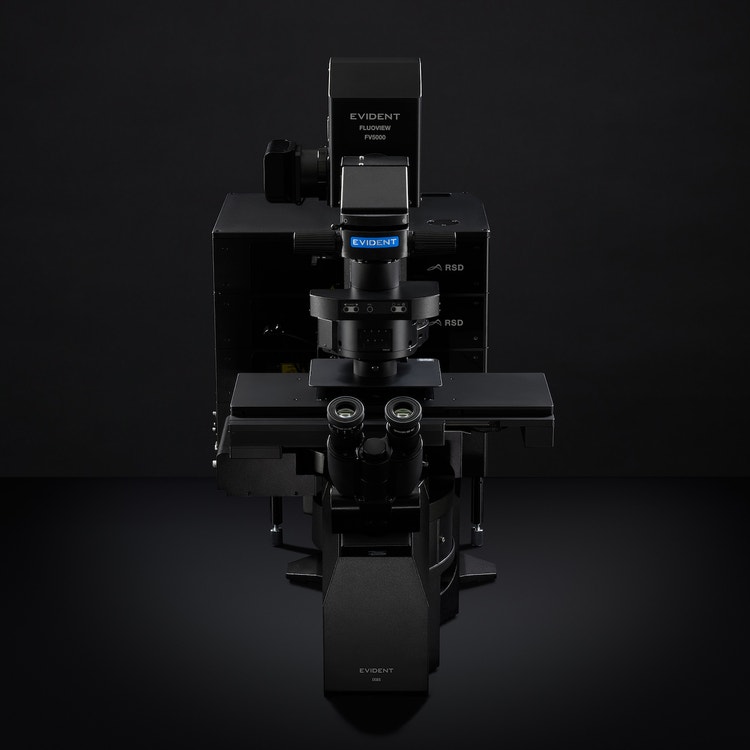
Die FV5000 ist eine Plattform der nächsten Generation, die entwickelt wurde, um schärfere, vollständig quantifizierbare Daten schneller und einfacher als je zuvor zu erfassen
Die Behebung dieser Probleme erfordert eine Softwareoberfläche, die intuitiv, optimiert und auf die Benutzer-Workflows abgestimmt ist.
Optimierung des Benutzererlebnisses mit FLUOVIEW Smart™ Konfokalsoftware
Die FLUOVIEW Smart konfokale Software von Evident wurde entwickelt, um Anwendern aller Erfahrungsstufen die sichere und effiziente Bedienung des FLUOVIEW™ FV5000 Laserscanning Mikroskops zu ermöglichen. Sie verfolgt drei zentrale Ansätze, um den operative Aufwand zu reduzieren und die Forschungsproduktivität sowie die Reproduzierbarkeit.
Grafische Benutzeroberfläche und Bildschirmunterstützung zur Senkung des Einarbeitungsaufwands
Grundlegende Mikroskopfunktionen – wie Einstellungen des Z-Bereichs und Auswahl des Objektivs – sind nicht bloß Konfigurationen, sondern wesentliche Informationen zum Verständnis des aktuellen Systemzustands. FLUOVIEW Smart visualisiert diese Einstellungen grafisch, sodass die Benutzer deren Bedeutung und Auswirkungen intuitiv erfassen können (Abbildungen 1 und 2).
Bildschirmanweisungen unterstützen weiterhin die Benutzer bei der Durchführung von Aufgaben ohne Verwirrung, verringern den Bedarf an ständiger Aufsicht und ermöglichen eine autonome Datenerfassung.
Inspiriert von echten Forschern, die sich den Herausforderungen der Wissenschaft stellen, revolutioniert das FV5000 die konfokale Bildgebung und macht sie intelligenter und schneller.
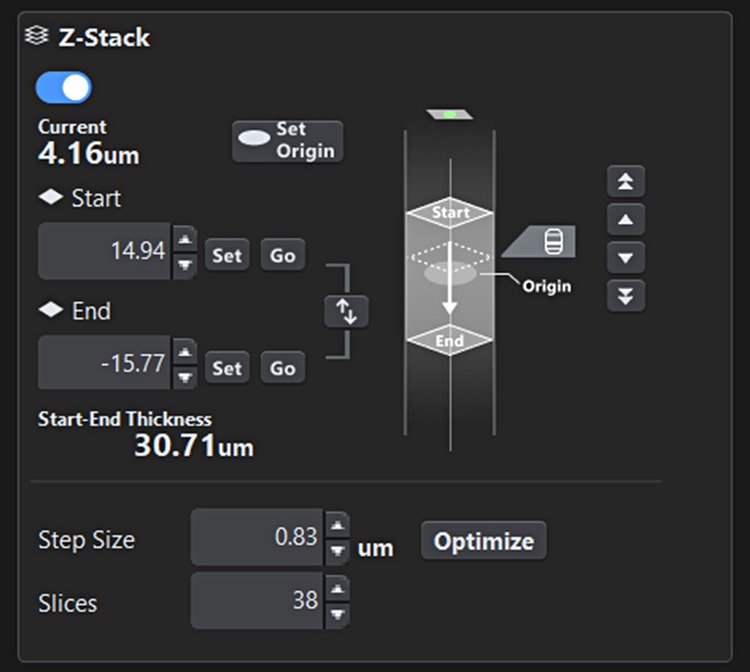
Abbildung 1. Z-Bereich-Einstellbildschirm. Die Start- und Endpositionen für die Bildgebung sowie die aktuelle Beobachtungsposition sind auf einen Blick deutlich erkennbar.

Abbildung 2. Objektiv-Auswahlbildschirm. Benutzer können intuitiv das gewünschte Objektiv auswählen, und das aktuell aktive Objektiv ist leicht erkennbar.
Layout nach Funktionspriorität
Anstatt alle Funktionen auf einem einzigen Bildschirm unterzubringen, ordnet die FLUOVIEW Smart™ Software sie hierarchisch nach Häufigkeit und Wichtigkeit an. Kritische Bedienelemente – wie Laserleistung, Scanbereich und Z-Stack-Einstellungen – sind stets leicht zugänglich und orientieren sich am natürlichen Workflow (Probenerkennung → Bedingungseinrichtung → Bildgebung). Dieses Design minimiert die Suchzeit und reduziert das Fehlerrisiko erheblich.
Zurücksetzen und automatisches Layout nach Verwendungszweck
Um Probleme in gemeinsam genutzten Umgebungen zu vermeiden, werden die Einstellungen der FLUOVIEW
Smart-Software beim Start automatisch auf die Standardwerte zurückgesetzt. Gleichzeitig können Benutzer frühere Einstellungen speichern und wieder aufrufen, um die Reproduzierbarkeit zu unterstützen. Zusätzlich passt die Auswahl eines Bildgebungszwecks (z. B. Z-Stapel, Zeitraffer, Mehrbereichs-Stitching) das Layout und die Benutzerführung automatisch an und bietet sowohl Anfängern als auch Experten eine optimale Benutzeroberfläche (siehe Abbildung 3).
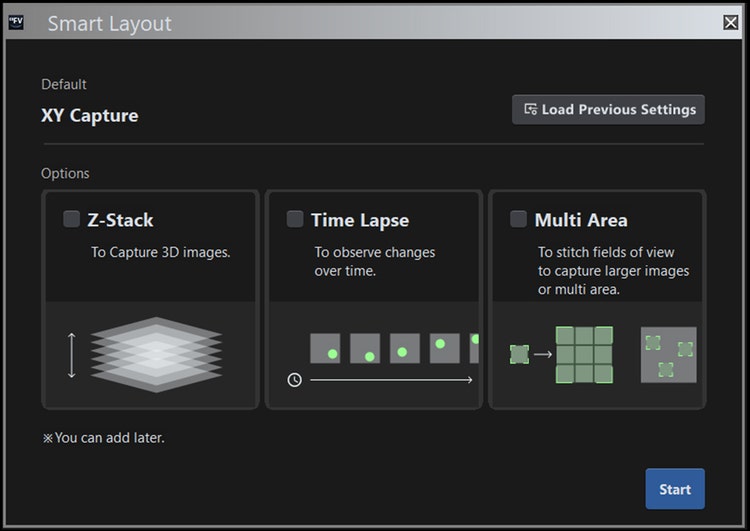
Abbildung 3. Bildschirm zur Zweckauswahl. Das Layout und die Bildschirmführung passen sich automatisch an den ausgewählten Bildgebungszweck an.
KI-gestützte Unterstützung für Einsteiger
Über die Vereinfachung der Benutzeroberfläche hinaus nutzt die FLUOVIEW Smart™ Software KI, um Abläufe zu automatisieren und zu optimieren, die besonders für Einsteiger anspruchsvoll sind.
Automatisierte Probenerkennung
Aufgrund der optischen Prinzipien der Konfokalmikroskopie kann der Bildschirm leer erscheinen, wenn die Probe in XY oder Z nicht fokussiert ist—was Einsteiger im Unklaren darüber lässt, ob das Problem auf Einstellungen oder eine Fehlfunktion der Hardware zurückzuführen ist.
Um dieser Herausforderung zu begegnen, haben Evident und Epistra – unter Nutzung ihrer bewährten Expertise in der KI-Entwicklung für die Lebenswissenschaften – gemeinsam einen Bilderkennungsalgorithmus entwickelt, der das Mikroskop automatisch in einen optimalen Zustand für die Probensuche schaltet und den Probenbereich identifiziert. Dies vereinfacht und beschleunigt einen Prozess erheblich, der zuvor für Anfänger schwierig war (Abbildung 4).
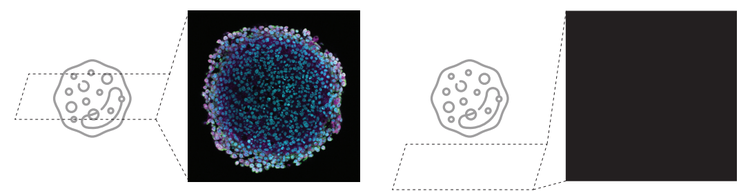
Abbildung 4. Die hohe Schwierigkeit der Probensuche in der konfokalen Laserscanning-Mikroskopie kann zur Folge haben, dass der Bildschirm leer bleibt (rechtes Bild).
Abbildung 5 veranschaulicht den gesamten Arbeitsablauf zur Schätzung der Probenposition.
Das System ist so konzipiert, dass es die Vorgehensweise eines erfahrenen Benutzers nachahmt: Grobe Ausrichtung der Z- und XY-Achsen mit einem Objektiv mit geringer Vergrößerung (4X), gefolgt von Feinabstimmungen mit einem Objektiv mit hoher Vergrößerung (10X). Konkret führt das System die folgenden vier Schritte nacheinander aus, um automatisch die optimale Probenposition zu bestimmen.
Z-SUCHE (4X)
Dieser Schritt führt eine sequentielle Suche* mit einem 4X-Objektiv durch, um die optimale Z-Position innerhalb des Suchbereichs grob zu bestimmen. An jeder Kandidaten-Z-Position wird ein Bild aufgenommen, und die KI bewertet dessen Fokuswert. Auf Grundlage dieser Ergebnisse aktualisiert das System autonom die nächste zu untersuchende Z-Position und wiederholt diesen Vorgang, bis die Position mit dem höchsten Fokuswert erreicht ist. Der Z-Suchbereich wird entsprechend der Auswahl des Benutzers im Assistenten eingestellt.
XY-SUCHE (4X)
Mithilfe des mit dem 4X-Objektiv aufgenommenen Bildes wird der XY-Tisch so bewegt, dass der Bereich mit der höchsten lokalen Helligkeit mittig auf dem Bildschirm erscheint. Vor diesem Prozess erkennt das System vordefinierte Artefakte (z. B. Containerränder). Werden Artefakte erkannt, wird eine Warnung angezeigt und der Prozess gestoppt. Der Benutzer kann dann die XY-Position der Probe bei Bedarf manuell anpassen.
Z-SUCHE (10X)
Nach dem Wechsel auf ein 10-fach Objektiv führt das System eine sequentielle Suche durch, um die optimale Z-Position innerhalb des Bereichs zu bestimmen. Der Z-Suchbereich wird anhand der bei 4-fach Objektiv ermittelten optimalen Z-Position und der Z-Auflösung des 4-fach Objektivs bestimmt.
XY-SUCHE (10X)
Im 10X-Bild wird der XY-Tisch so bewegt, dass der Bereich mit der höchsten lokalen Helligkeit auf dem Bildschirm zentriert wird. Nach Abschluss dieses Vorgangs zeigt das System dem Benutzer das aktuelle Mikroskopbild und schließt damit den Suchprozess ab.
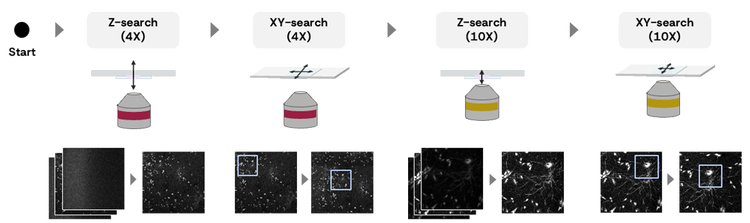
Abbildung 5. Gesamtworkflow zur Positionsschätzung der Probe:
Z-SUCHE (4X)
• Scannen Sie die Probe grob entlang der Z-Achse mit geöffneter konfokaler Blende.
• Stellen Sie die konfokale Apertur auf 1 Airy-Einheit ein und justieren Sie die Z-Position für optimale Fokussierung.
XY-SUCHE (4X)
• KI-Anomalieerkennung (wenn das Präparat nicht erkannt wird oder der Rand des Deckglases/Wells erkannt wird).
• Bewegen Sie den Objekttisch zu einer helleren Stelle des Präparats.
• Abbilden Sie das 4X-Bild auf der Karte.
Z-SUCHE (10X)
• Scannen Sie die Probe grob entlang der Z-Achse mit geöffneter konfokaler Blende.
• Stellen Sie die Z-Position mit einer konfokalen Apertur von 1 Airy-Einheit für eine optimale Fokussierung fein ein.
XY-Suche (10x)
• Bewegen Sie den Objekttisch zu einer helleren Stelle des Präparats.
Imaging Condition Optimization
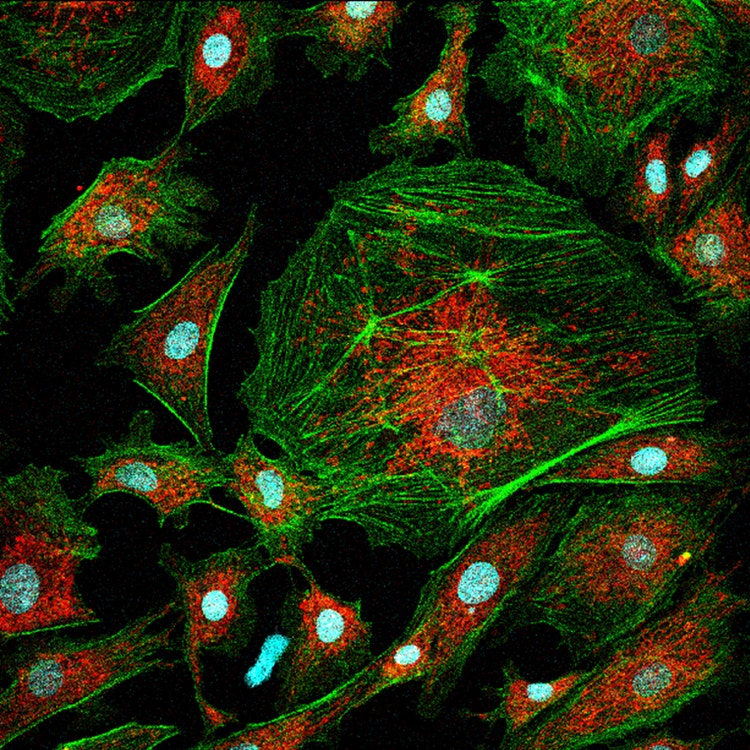
Bei der herkömmlichen konfokalen Laserscanning-Mikroskopie besteht ein inhärenter Zielkonflikt zwischen Detektorempfindlichkeit und Laserleistung, sodass die optimalen Einstellungen durch Ausprobieren ermitteltwerden müssen. Anfänger stehen oft vor dem Dilemma, dass eine Erhöhung der Empfindlichkeit zu mehr Rauschen führt, während eine Erhöhung der Laserleistung das Risiko birgt, die Probe zu beschädigen (Abbildung 6). Daher kann die Ermittlung der geeigneten Bildgebungsbedingungen zeitaufwändig. sein.
Evident begegnet dieser Herausforderung mit seiner proprietären SilVIR™-Detektortechnologie der nächsten Generation, die eine Anpassung der Detektorempfindlichkeit überflüssig macht. Dadurch verringert sich die Anzahl der Parameter, die Benutzer konfigurieren müssen, was zu einer einfacheren Bedienung führt. Folglich ist die Einstellung der Laserleistung zur Erzielung des gewünschten Kontrasts der wichtigste Faktor für die Bildqualität.
FLUOVIEW Smart™-Software ermittelt automatisch die optimale Laserleistung auf Basis von Echtzeit-Bildanalyse und Vorhersagen des maschinellen Lernens. Benutzer können Einstellungen einfach an ihre Bedürfnisse anpassen, indem sie einen Modus entsprechend der Priorität zwischen minimaler Probenbeschädigung und maximalem Kontrast auswählen.
ZU HOHE LASERLEISTUNG
Eine zu hohe Laserleistung führt zu hoher Phototoxizität.
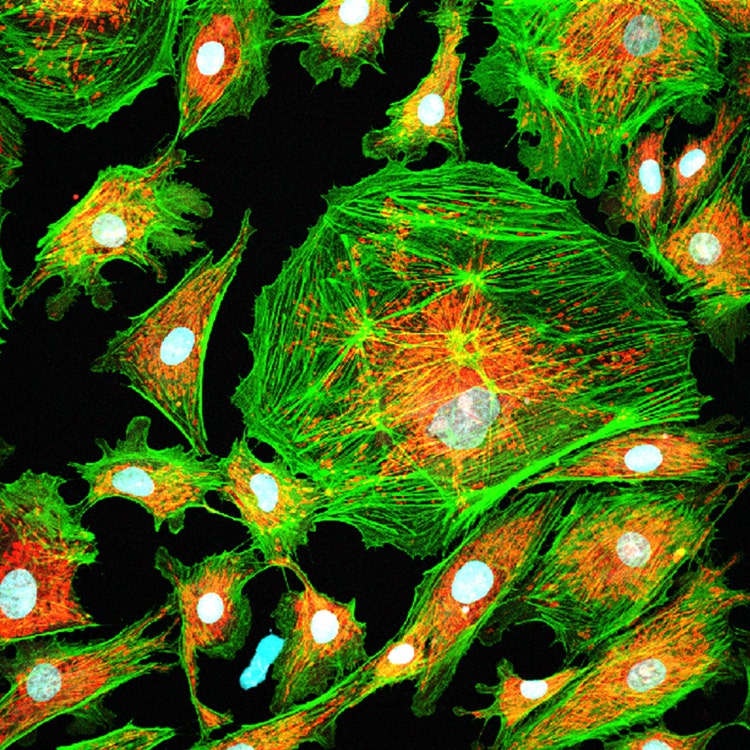
Abbildung 6. Abwägung zwischen Laserleistung und Bildqualität.
ZU GERINGE LASERLEISTUNG
Eine zu geringe Laserleistung führt zu verrauschten Bildern.
Der Gesamtprozess gestaltet sich wie folgt:
MODUSAUSWAHL
Der Anwender wählt einen von drei Modi – Schonend, Ausgewogen oder Qualität – je nach Priorität zwischen Probenschonung und Bildkontrast aus.
AUTOMATISCHE LASERLEISTUNGSANPASSUNG
Wenn der Benutzer auf die Schaltfläche „Ausführen“ klickt, stellt das System automatisch die optimale Laserleistung ein und schließt den Vorgang ab. Während der Ausführung erfolgen intern die folgenden Schritte:
- Vier Bilder werden bei unterschiedlichen Laserleistungsstufen aufgenommen.
- Für jedes Bild berechnet das System einen KI-Wert als ein Indikator für die Bildqualität (Schritte 1–3 in Abbildung 7). Die KI-Werte werden grafisch dargestellt, und basierend auf dem Diagramm und dem ausgewählten Modus schätzt das System die optimale Laserleistung (Schritt 4 in Abbildung 7).
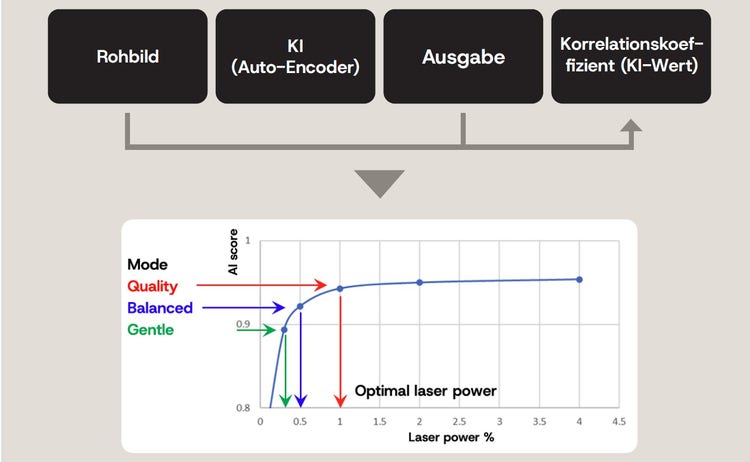
Abbildung 7. Konzept der Laserleistungsschätzung mit den folgenden Schritten: 1: Saubere, rauscharme Bilder aus dem Rohbild mithilfe von KI-Version 2 vorhersagen: Vergleiche das vorhergesagte Bild mit dem ursprünglichen Rohbild. 3. Berechne einen Korrelationskoeffizienten (KI-Wert: Ein hoher AI-Score ist stabil bei geringem Rauschen, ein niedriger
AI-Score ist instabil bei hohem Rauschen. 4. Bestimmen Sie die optimale Laserleistung abhängig vom ausgewählten Modus
Anmerkung: Der KI-Score ist dem Signal-Rausch-Verhältnis (SNR) des Bildes ähnlich, jedoch mit geringfügigen Unterschieden. Mit zunehmender Laserleistung steigt der KI-Score, was eine verbesserte Bildqualität aufgrund des reduzierten Rauschens widerspiegelt. Der Plateau-Bereich der KI-Bewertungskurve zeigt eine geeignete Laserleistungseinstellung an:
In diesem Bereich führen weitere Erhöhungen der Laserleistung nur zu minimalen Verbesserungen der Bildqualität, was sie ineffizient macht.
Zusammenfassung
Die FLUOVIEW Smart™ Konfokal-Software vereinfacht die Benutzeroberfläche der FLUOVIEW™ FV5000 Laserscanning-Mikroskope und optimiert die Arbeitsabläufe durch KI-Technologie (Abbildung 8).
• Komplexe Software-Oberflächen erschweren den Einstieg für neue Anwender erheblich.
• Die Vereinfachung wird durch priorisierte Funktionen, ein workfloworientiertes Bedienkonzept und eine grafische Benutzeroberfläche erreicht.
• KI automatisiert die Probenerkennung und die Anpassung der Laserleistung, wodurch die Betriebskomplexität deutlich reduziert wird.
Durch die Kombination einer benutzerfreundlichen Softwareoberfläche mit KI-gestützten intelligenten Assistenzfunktionen ermöglicht die FLUOVIEW Smart Software auch Einsteigern, innerhalb kurzer Zeit hochwertige Bilder zu erfassen und verbessert so die Produktivität und Reproduzierbarkeit in Forschungsumgebungen.
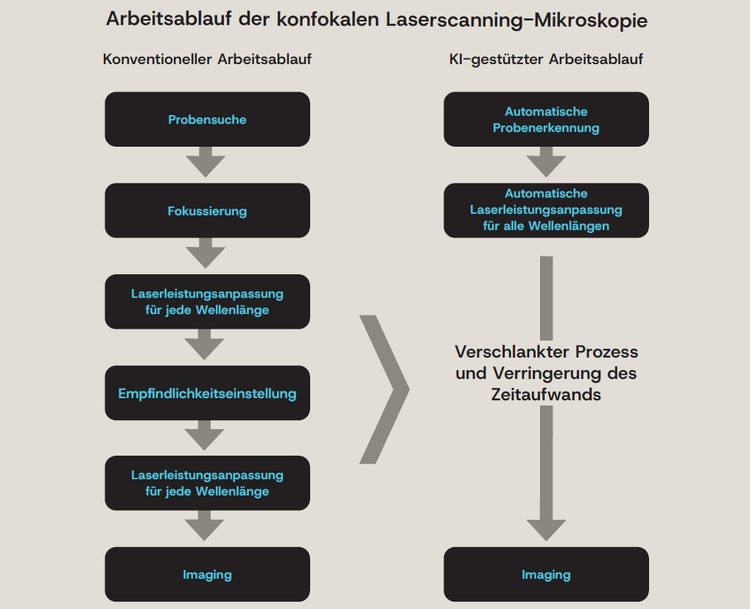
Abbildung 8. Vereinfachung der konfokalen Mikroskopiebeobachtung durch einen KI-gestützten Workflow.

Globaler Produktmanager, High-End-Bildgebungssysteme, Biowissenschaften
Ryoji Kitamura erwarb seinen Master-Abschluss an der Graduate School of Information Science and Technology der Universität Hokkaido, wo er sich auf die in vivo-Bildgebung mittels Multiphotonenmikroskopie konzentrierte. Er begann seine Karriere bei Evident als Softwareentwickler und wurde später Produktleiter für den universellen Ganzschnitt-Bildgebungsscanner SLIDEVIEW™ VS200. Darüber hinaus war er als Global Product Manager für das inverse Mikroskopsystem IXplore™ IX85 tätig. Derzeit ist er Global Product Manager für die konfokale Mikroskopserie FLUOVIEW™ und leitet die Produktstrategie, -planung und -entwicklung.
FV5000 Konfokales Laser-Scanning-Mikroskop
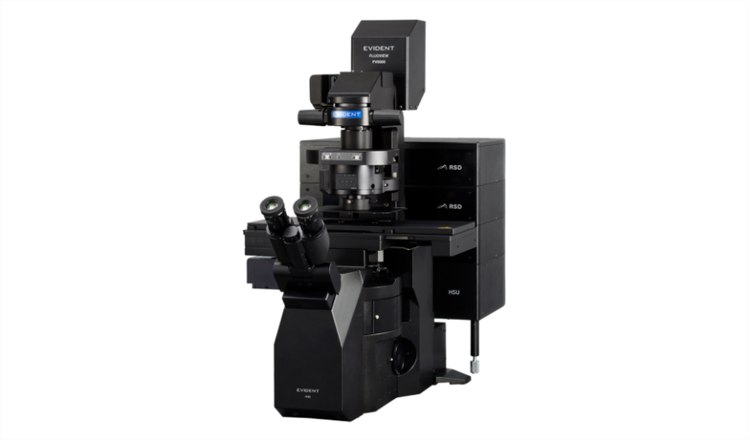
FV5000
Konfokal-Laserscanning-Mikroskop
- Außergewöhnliche Klarheit, Geschwindigkeit und Zuverlässigkeit dank bahnbrechender Innovationen
- SilVIR™-Detektoren ermöglichen die Quantifizierung auf Photonenebene, außergewöhnliche Empfindlichkeit und ein ultrahohes Signal-Rausch-Verhältnis.
- Unübertroffener Dynamikbereich erfasst das gesamte Signalspektrum und verhindert Sättigung.
- Hochgeschwindigkeits-2K-Resonanzabtastung und hochdichte 8K-Galvo-Abtastung auf einer Plattform
- Die FLUOVIEW Smart™-Software vereinfacht die Bedienung durch intuitive Steuerelemente und KI-gestützte Automatisierung.
- TruResolution™-Autokorrekturring optimiert den Fokus für mehr als 20 Objektive.
- Modulares Design unterstützt bis zu 10 Laserlinien und zukünftige Multiphotonen-Upgrades.
- Laser Power Monitor (LPM) gewährleistet eine stabile Ausleuchtung und reproduzierbare Ergebnisse im Zeitverlauf.