CIX100 Inspection System
The CIX100 inspection system is a dedicated, turnkey solution for manufacturers who maintain the highest quality standards for the cleanliness of manufactured components. Quickly acquire, process, and document technical cleanliness inspection data to comply with company and international standards.
Paired with PRECiV™ CIX software, the CIX100 delivers reliable technical cleanliness analysis at industry-leading speed, making it ideal for high-throughput labs. The interface guides users through each step, so even novice operators can acquire cleanliness data quickly and easily. Compliant results are customized to company and industry standards, including ISO 16232 and VDA 19, in just one click. For regulated environments such as pharmaceutical quality control, a built-in audit trail keeps results secure and traceable in line with FDA 21 CFR Part 11.
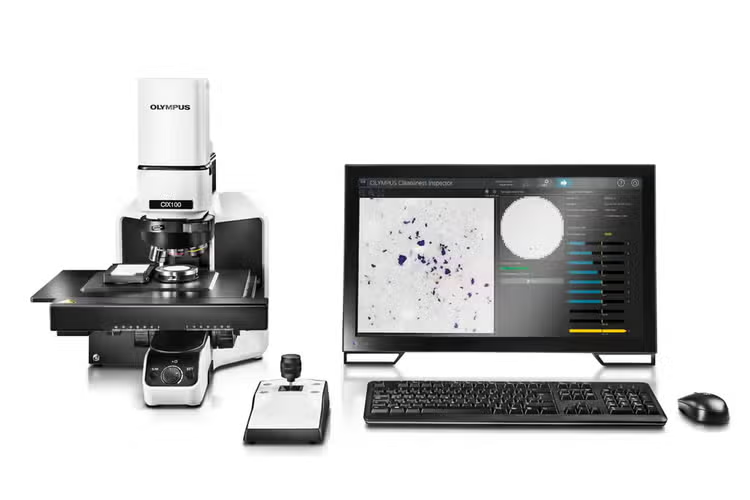
CIX100 Inspection System
Simplify Your Technical Cleanliness
Cleanliness of components, fluids, and parts is vital to every stage of manufacturing, where even micron-sized particles can shorten component life or compromise performance. Strict international and national directives define how contamination must be measured and documented, demanding detailed insight into particle counts, size distribution, and characteristics.
The CIX100 inspection system brings confidence to this process—a turnkey, high-throughput solution that meets modern cleanliness standards with ease. With advanced deep-learning AI, it takes particle identification further, revealing insights that help teams protect quality from the start.
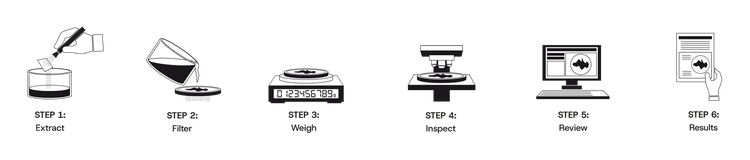
Standard process for cleanliness inspection: preparation (steps 1–3) and investigation (steps 4–6)
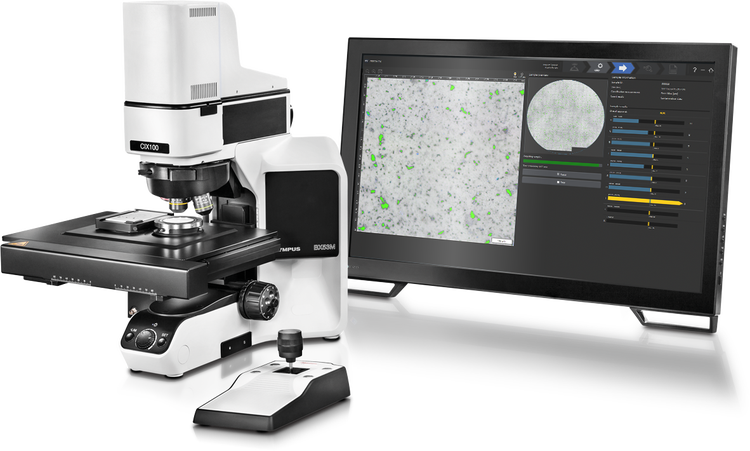
Reliable Turnkey Solution for Technical Cleanliness
The CIX100 is a turnkey solution designed to meet the needs of automated cleanliness inspections. Each component is optimized for accuracy, reproducibility, repeatability, and seamless integration for reliable data in a high-throughput system. Automation of critical tasks helps speed up inspections while minimizing human errors and the risk of contaminating the sample.
Excellent Optical Quality
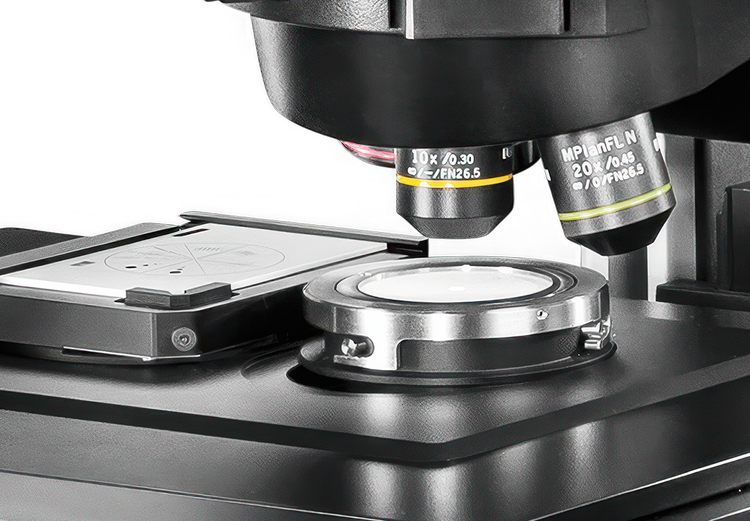
Our UIS2 objectives provide high optical performance for excellent measurement and analysis accuracy. A dedicated light source maintains a consistent color temperature optimized for cleanliness inspection. This performance supports fast inspections of both circular and rectangular sample areas.
Mechanical Stability
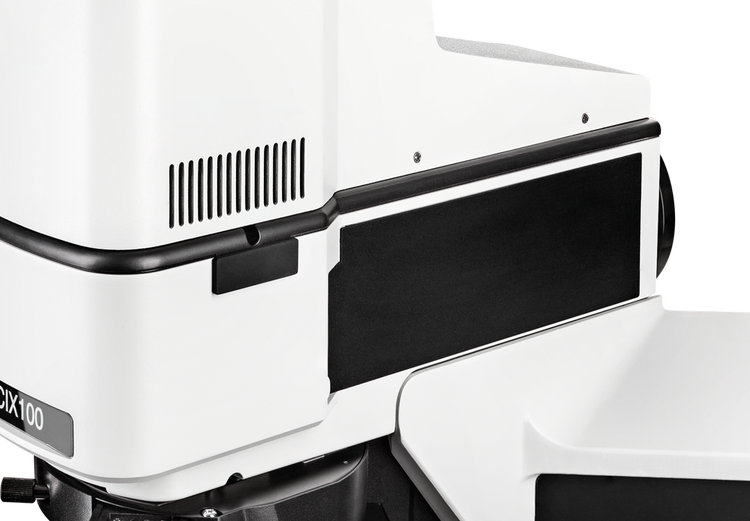
The optical path alignment, motorized nosepiece, and camera are protected by a cover to prevent accidental modifications. For greater stability, all moving parts have been eliminated from the optical light path.
Regular System Verification
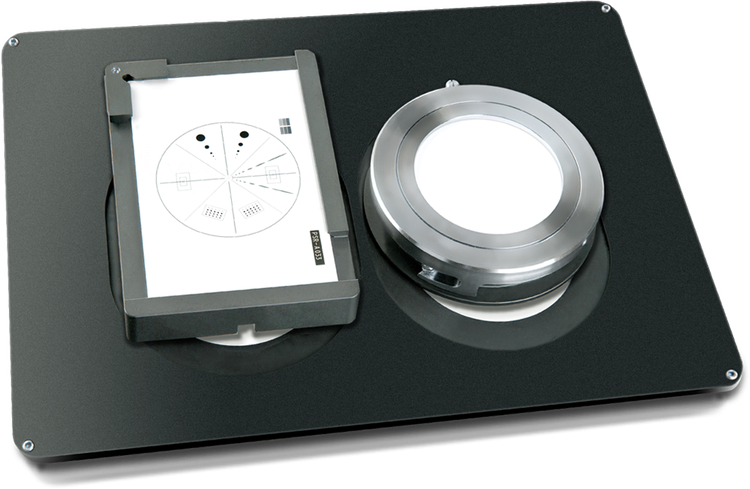
The preconfigured and pre-calibrated system has reminders for automatic system self-checks with the integrated calibration slide that helps maintain regular system verification.
Reproducibility and Repeatability
The preconfigured and precalibrated system, user rights management, and regular system self-checks help ensure that the settings are correct for reproducible inspection data independent of the operator or instrument. As a result, multiple departments and sites can apply the same quality standards at different locations.
Versatility for Common Sampling Methods
The CIX100 supports sampling techniques with circular or rectangular inspection areas. Choose from holders with white or black backgrounds for filter membranes with a diameter of 25 mm, 47 mm, and 55 mm; holders for tape lift sampling; holders with a flat surface for metallurgy applications; and holders for particle traps.
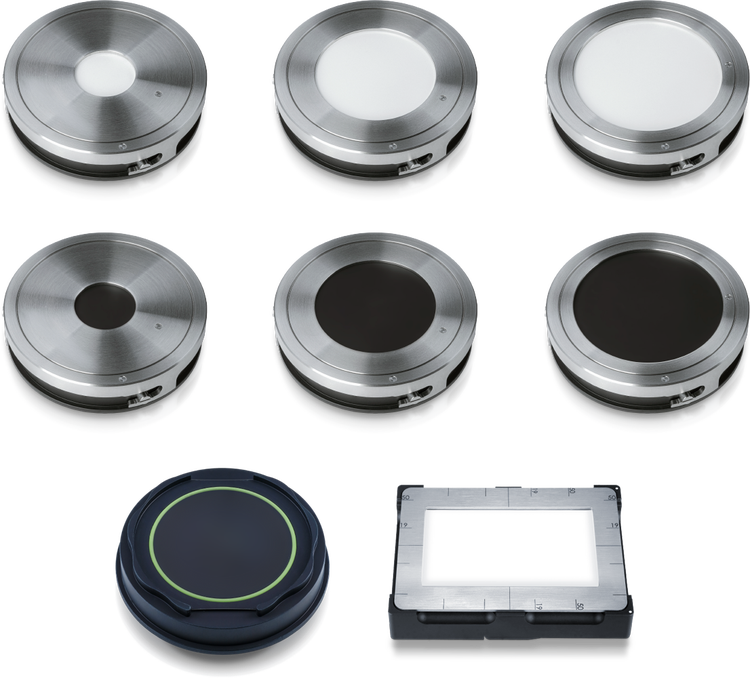
Top and middle: circular sample holders with white and black backgrounds for filter membranes with diameters of 25 mm, 47 mm, and 55 mm. Bottom left: circular sample holder for particle traps. Bottom right: rectangular sample holder for tape lift sampling.*
*Availability of the tape lift holder may vary by region.
Intuitive Guidance
Easy for Every Experience Level
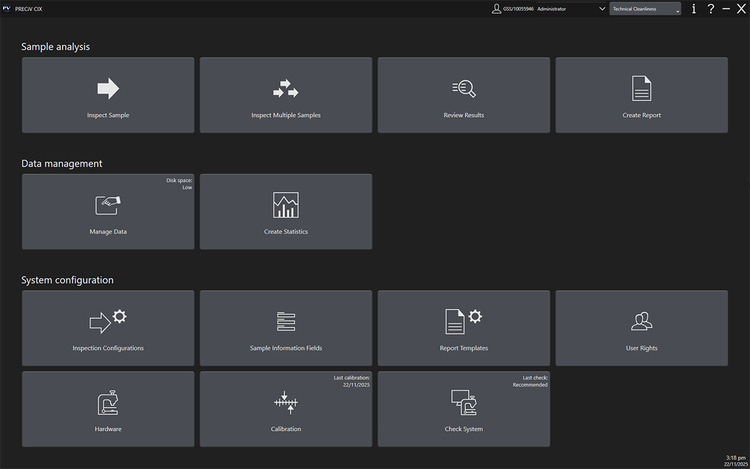
PRECiV™ CIX software provides step-by-step guidance, making technical cleanliness inspections easy for all experience levels. Intuitive workflows and user rights management improve confidence in results while reducing cycle time, cost per test, and user errors. The result is a system optimized for productivity and high-quality standards.
Guided Workflows
An intuitive workflow guides users through three steps: Inspect Sample, Review Results, and Create Report. From scanning the sample to creating compliant reports, maximized automation improves ease of use so that users of all levels can perform efficient inspections and produce reliable data.

Intuitive workflow with large buttons that are easy to click with a mouse or the touch-screen monitor. Workflow steps from left to right: Mount Sample, Edit Settings, Run Inspection, Review Results, and Create Report.
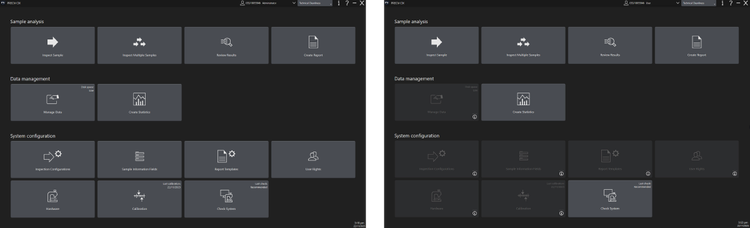
User Rights Management Tools
Administrators can control which users have access to different parts of the system, helping novice users stay on task. It also prevents accidental modification of critical parameters, such as calibration and data selected for the automatically generated report.
Advanced Microscopy
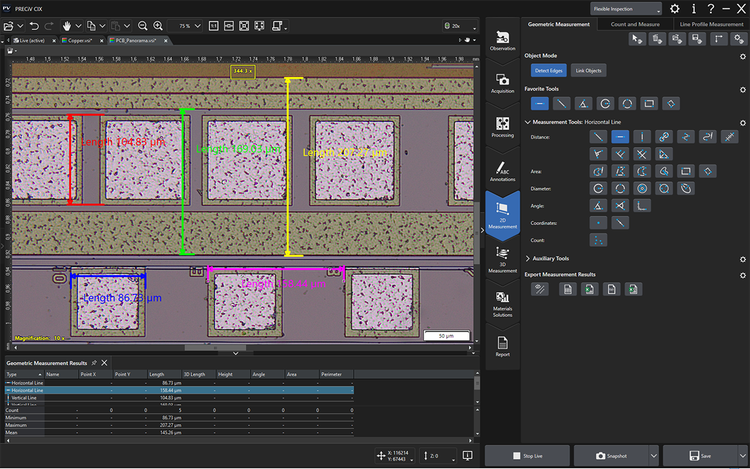
PRECiV CIX microscope mode* enables you to leave the dedicated cleanliness inspection workflow to perform microscopic imaging, including extended focus imaging (EFI) and 2D measurement.
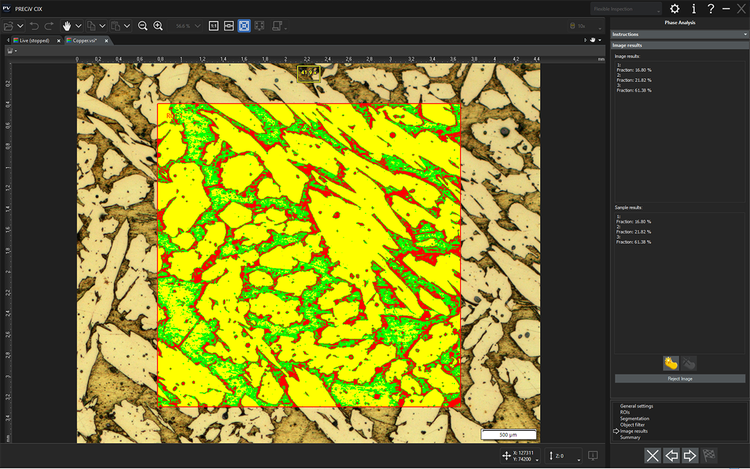
Expand the microscope mode capabilities with optional material analysis solutions, such as Grain Sizing, Cast Iron, and Phase Analysis. As needed, these solutions can be extended with special functions customized to individual users or applications.
*Microscope mode is an optional solution in PRECiV CIX.
Fast Analysis
Fast Live Analytics and Reviews
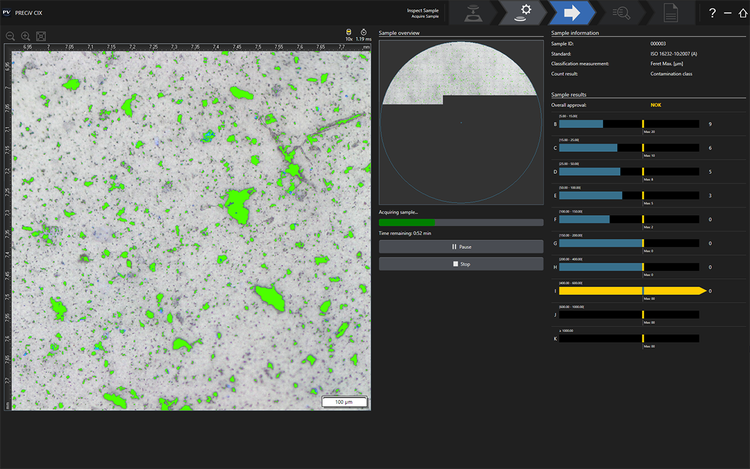
With an innovative polarization method, CIX100 delivers image acquisition and precise live analytics of both reflective (metallic) and non-reflective (non-metallic) particles, ranging from 2.5 µm up to 42 mm, all in a single scan.
Counted and sorted particles are displayed live and sorted into size classes during the scan, supporting fast decisions in case of a failed test.
All-in-One Scan for High Throughput
The innovative polarization method based on wavelength separation and color detects both reflective (metallic) and non-reflective (non-metallic) particles in a single scan, offering multiple benefits for high-throughput labs:
- Detects reflective and non-reflective particles twice as fast as conventional methods that require two separate images
- Eliminates moving components from the optical light path, such as the polarizer, which could impact the system stability and lead to incorrect results
- Increases the number of inspected particles, reducing the cost per test

The innovative illumination system separates reflective (metallic) and non-reflective (non-metallic) particles in a single scan.
Review Particles in Real Color
Activate real color mode to view particles in their actual colors, providing more information to identify the particle type as metallic or non-metallic.
The all-in-one scan shows all reflective particles as blue in polarization, indicating they’re metallic. In real color mode, the blue color of reflective particles is omitted, revealing the true colors of all particles in the brightfield image. Materials that are actually blue remain blue, while metals show their metallic shine and the reflections typical for the material.
These helpful visuals help you better understand the nature of each particle and quickly confirm the particle type.
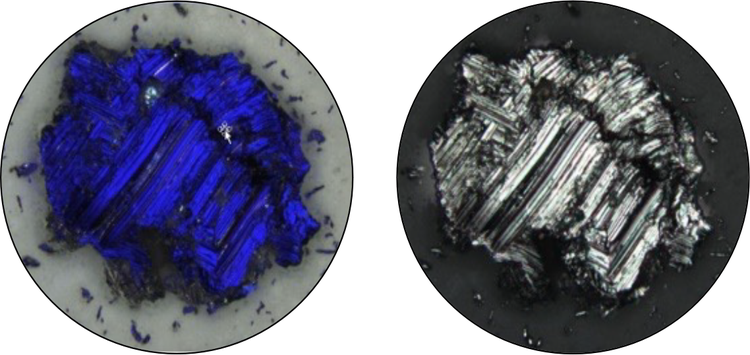
Particle as seen by the system during detection and analysis. The blue color indicates that this particle is metallic. The same particle as seen during the review mode in real color using the U-ANT filter and the color correction mode. The particle is confirmed as metallic.
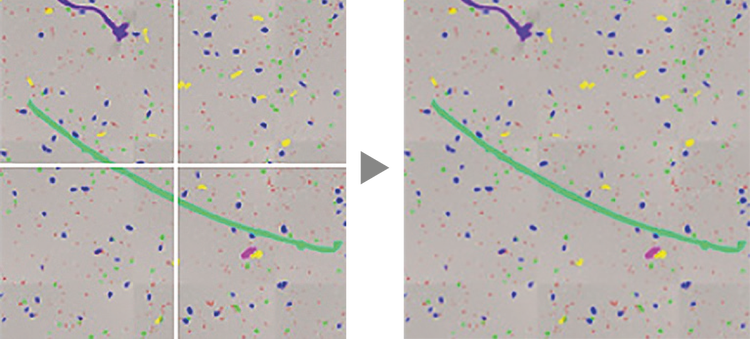
Large particles are automatically combined and analyzed.
Intelligent Handling of Particles
The CIX100 offers live processing and classification of both small and large particles (2.5 μm up to 42 mm) according to international standards and automatically reconstructs images of large particles. Dark particles on a bright background and vice versa can be analyzed.
Identification of Filter Coverage
The sample overview image is created at the start of the sample inspection and displays the entire filter at low magnification, enabling the identification of filter coverage or particle clusters before the inspection begins. The system automatically informs users if the filter assignment is higher than desired so they can react quickly.
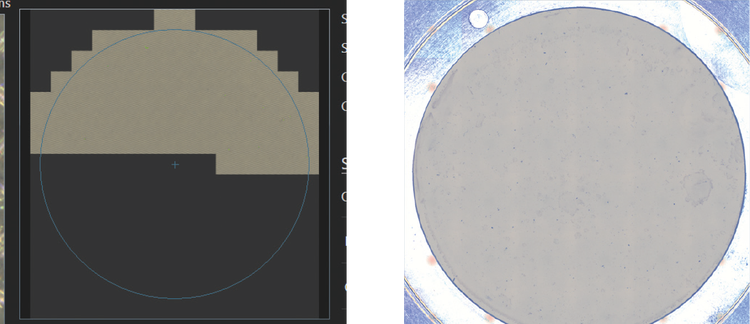
The overview image identifies filter occupancy and particle clusters.
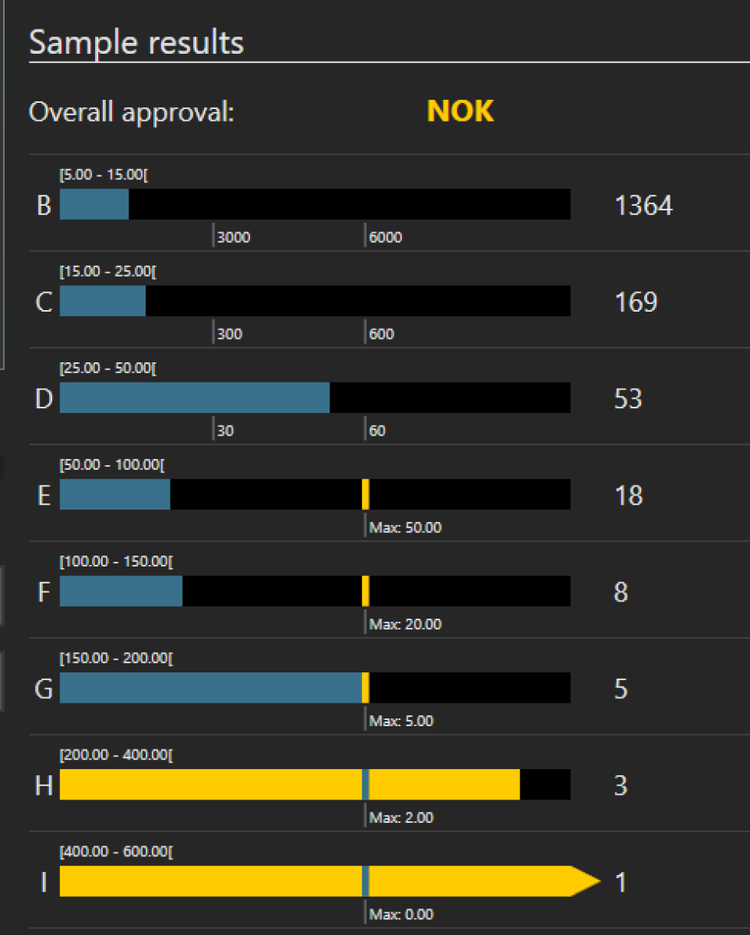
Direct Result Feedback
Contaminants are automatically analyzed and sorted into size classes defined by the selected standard, then color coded to indicate any class exceeding a preset limit. Acceptable particle counts per size class are displayed, enabling early sample validation (OK) or rejection (NOK), even before the entire membrane is scanned.
As required by the electric mobility and medical device industries, PRECiV CIX software lets you evaluate the approval limits for individual particle types. An acoustic signal can be switched on to notify users when the approval reads NOK or the inspection is complete.
Analysis Beyond Classical Algorithms
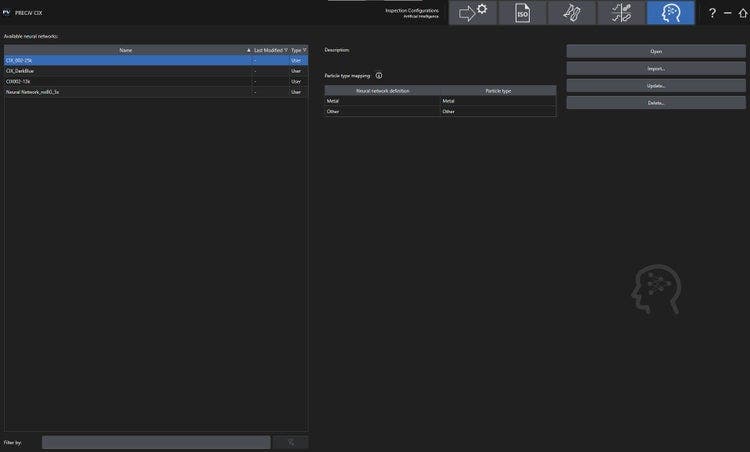
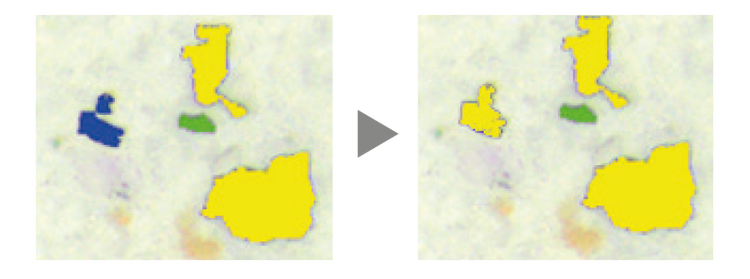
With integrated TruAI deep-learning technology, the CIX100 can analyze images beyond classical algorithms. Apply a trained neural network to your samples for a more reproducible and robust analysis. The TruAI solution enables you to distinguish between different particle types, such as reflecting and non-reflecting.
Data Insights for Faster Decisions
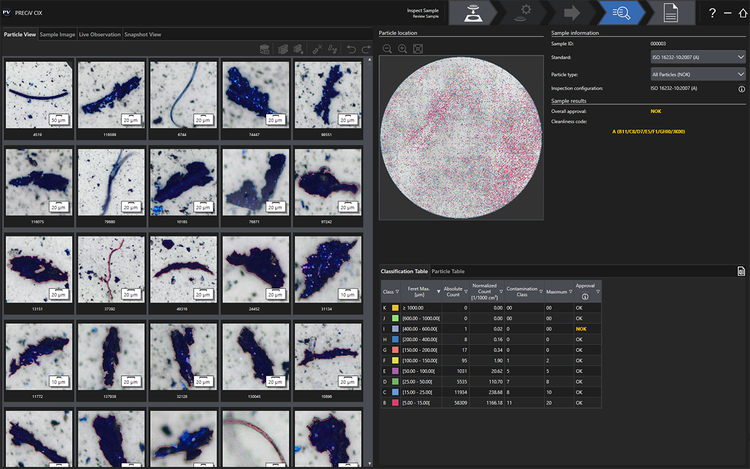
The CIX100 combines intuitive tools to revise inspection data with a fast, guided particle review. One-click reclassification ensures flexibility and supports international standards. Thumbnail images of detected contaminants link directly to dimensional measurements for easy data review.
Contaminant results update automatically across all views and size classes during the review process. This saves time with clear representations of all relevant inspection results.
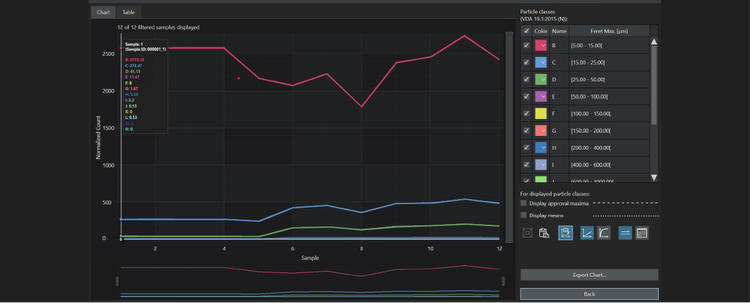
Trend Analysis
Data statistical analysis can be performed over time and graphically displayed.
Inspection Data at a Glance
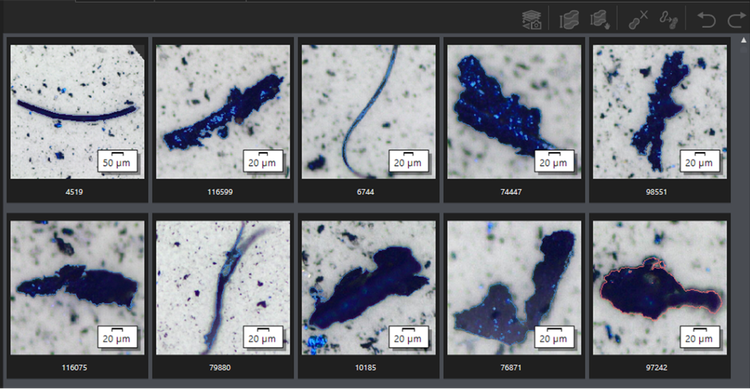
- Clear arrangement of images, data, and results for immediate decisions on reprocessing
- At-a-glance display of inspection data in various selectable views
- Images of particles are organized from largest to smallest for all types of particles (reflective or non-reflective)
Review, Revise, and Recalculate
A manual check and review of the results is generally recommended in technical cleanliness inspection, and the interface makes interactive correction of the particle data quick and easy.
Height Measurement Solution
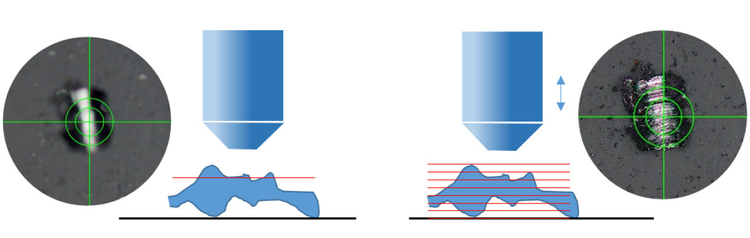
The CIX100 offers an extended focus imaging (EFI) function that captures images of contaminants and particles whose height extends beyond the objective’s depth of focus and stacks them together to create an all-in-focus image.
Further enhance the CIX100 with our height measurement solution, comprised of a 20X objective* and special software, to fulfill the VDA 19 requirements for height measurements. For selected particles, the measurement is performed either automatically or manually. The calculated value is listed as an additional data field in the results sheet.
*Must be ordered separately from the height measurement solution license.
Compliant Results
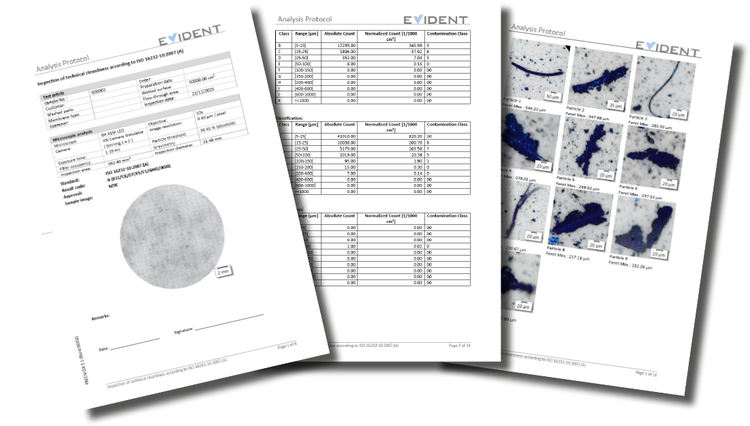
Reports can be adapted to individual needs.
One-Click Digital Documentation
Generate professional reports in one click with predefined templates that comply with industry standards, such as ISO and VDA, and easily adapt templates and reports to meet company regulations.
Export the results to Microsoft Word or directly export as a PDF for easy data sharing over email. The CIX100 can also archive reports and data for recordkeeping and trend analysis.
Easy Data Export
Create reports in Microsoft Word or PDF format, depending on your preference, and easily export the particle and classification results and trend analysis to Microsoft Excel. Report file sizes are optimized for efficient data sharing.
Individual images of contaminants can be taken and processed for manual measurement confirmation and improved documentation.

Long-Term Data Storage
Quickly access all archived samples and their associated data and reports for revision or distribution. All inspection data and reports are automatically saved and archived for a certain period of time.
Specifications
Hardware
| Microscope | CIX100 | Motorized focus |
|
| Illumination |
|
||
| Imaging device |
|
||
| Sample size |
|
||
| Nosepiece | Motorzied type | Motorized nosepiece |
|
| Software controlled |
|
||
| Stage | Motorized stage X, Y | Motorized stage X,Y |
|
| Software controlled |
|
||
| Specimen holder | Sample holder |
|
|
| Particle standard device (PSD) |
|
||
| Stage insert | 2-position stage insert |
|
|
| Controller | Workstation | High-performance pre-installed workstation |
|
| Add-in boards |
|
||
| Language selection |
|
||
| Touch panel display | 23-inch slim screen |
|
|
| Power | Rating |
|
|
| Power consumption |
|
||
| Drawing | Dimensions (W × D × H) | Approx. 1300 mm × 800 mm × 510 mm (51.2 in. × 31.5 in. × 20.1 in.) | |
| Weight | 44 kg (97 lb) | ||
System Environment Limitations
| Normal use | Temperature | 10 °C to 35 °C (50 °F to 95 °F) |
| Humidity | 30 to 80% | |
| For safety regulations | Environment | Indoor use |
| Temperature | 5 ℃ to 40 ℃ (41 °F to 104 °F) | |
| Humidity |
|
|
| Altitude | Up to 2,000 m (6,562 ft) | |
| Level of horizon | Up to ±2° | |
| Power supply and voltage stability | ±10% | |
| Pollution level (IEC60664) | 2 | |
| Overall voltage category (IEC60664) | II |
Software
| Software | PRECiV CIX |
|
| Languages | GUI |
|
| Online help |
|
|
| License management |
|
|
| User management |
|
|
| Live image | Display in color mode |
|
| Window fit method |
|
|
| Live detection |
|
|
| Live classification |
|
|
| Microscope mode |
|
|
| Image capture and manual measurements | Collecting user snapshots |
|
| Manual measurements |
|
|
| Hardware control | XY motorized stage |
|
| Motorized nosepiece |
|
|
| Motorized focusing |
|
|
| Check system | System verification |
|
| Selectable objective |
|
|
| Technical cleanliness standards | Supported standards: |
|
|
Fully compliant to VDA 19.1 and VDA 19.2 recommendations |
|
|
| Identification of particle family |
|
|
| Customized standards |
|
|
| Inspection configuration |
|
|
| Particle tile view | Displays the detected particles in tile for improved navigation |
|
| Store the full membrane | The complete filter is stored |
|
| Data export | Save data |
|
| Trend analysis | Trend analysis over several samples (Built-in SQC tool) |
|
| Particle editing | Particles can be edited during the revision process. |
|
| Dynamic reports | Professional analytical reports can be produced by using Office 2024 and Microsoft 365 Home and Business (license not included) |
|
Height Measurement Solution
| PV-CIX-S-HM | Automatic or manual height measurement of selected particles |
|
Advanced Microscopy Functions
●: Standard Feature; ○: Optional Feature
Environmental Law and Regulations
| Europe | Low Voltage Directive 2014/35/EU |
| EMC Directive 2014/30/EU | |
| RoHS Directive 2011/65/EU | |
| REACH Regulation No. 1907/2006 | |
| Packaging and Packaging Waste Directive 94/62/EC | |
| WEEE Directive 2012/19/EU | |
| Machinery Directive 2006/42/EC | |
| USA | UL 61010-1:2010 Edition 3 |
| FCC 47 CFR Part15 SubPartB | |
| Canada | CAN/CSA-C22.2 (No. 61010-1-12) |
| Australia | Radio communications Act 1992, Telecommunications Act 1997 |
| Regulation on Energy conservation AS/NZS 4665-2005 | |
| Japan | Electrical Appliances and Material Safety Act (PSE) |
| Korea | Electrical Appliances Safety Control Act |
| Regulation on Energy Efficiency Labeling and Standards | |
| Regulations for EMC and Wireless Telecommunication (Notice 2913-5) | |
| China | China RoHS |
| China PL Law | |
| Regulation for Manuals |
Resources
Blog
Videos
CIX100 Cleanliness Inspection System Hardware Accessories: Particle Traps
CIX100 Cleanliness Inspection System Hardware Accessories: Sample Holders for Common Cleanliness Applications
CIX100 Cleanliness Inspection System Hardware Accessories: Filter Membranes
CIX100 - Technical Cleanliness Inspection System