Microscopio a fluorescenza da banco APEXVIEW APX100

Il microscopio a fluorescenza da banco APEXVIEW APX100 rende rapido e semplice l'acquisizione di immagini di microscopio di qualità professionale. Costruito con la rinomata ottica Olympus, un'interfaccia utente intuitiva, una potente IA e una serie di funzioni intelligenti, il sistema APX100 combina la facilità d'uso di un microscopio all-in-one con dati di immagini di alta qualità per soddisfare le tue esigenze di ricerca.
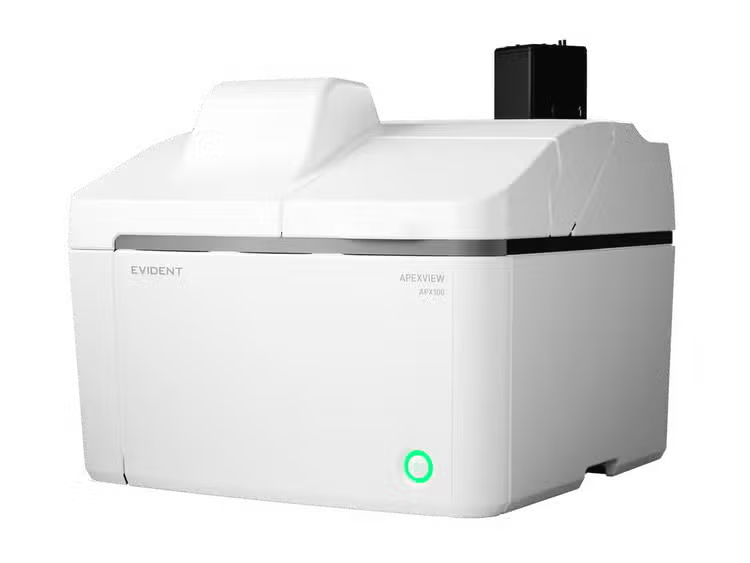
APX100 Benchtop Fluorescence Microscope

Exceptional Imaging Made Easy

The APX100 microscope supports a wide range of research imaging applications for slides, dishes, and well plates. Use the included imaging methods such as multichannel, stitching, time-lapse, and Z-stack acquisition in any combination to fit your research protocol.

Stay Focused on Your Research

The APX100 all-in-one microscope’s smart sample navigator and fast autofocus enable you to spend less time searching for samples and more time collecting data.

Easy-to-Use Research Microscope

Publication-Quality Images Fast

Mouse kidney. Alexa Fluor 488 WGA, Alexa Fluor 568 Phalloidin, DAPI.

Publication-Quality Images in a Few Clicks

The APX100 microscope is built with the same quality optics and technology as our high-end systems, so you can be confident in the quality of your images.

See more application examples

Fast, Efficient Microscope Data Management

The system keeps your data organized and acquisition parameters saved for future reference.

Learn more about data management solutions
Fast, Efficient Microscope Data Management
Marlow Ingredients

Testimonials

”I have been genuinely pleased with the APX100 performance so far in a busy, diverse laboratory. It is feeding data to multiple in-house projects, as well as helping us set up capabilities for new academic collaborations. The options for upgrades are very good, with the advantage of a lower capital expenditure investment.”

Mark Taylor, PhD
Fermentation Lead
Marlow Ingredients

Applied Technologies

Automatic Sample Detection

Place your sample in the sample holder, and the smart sample navigator automatically acquires a macro image. The AI then locates your sample on the slide and automatically positions it above the objective, so that you can choose the observation method and immediately begin capturing images.

Read a white paper to learn more

https://adobeassets.evidentscientific.com/content/dam/video/video/library/01_Smart_Sample_Navigator_FINAL_EDITED_NO_SUBTITLE_w-VO_1(2).mp4

https://adobeassets.evidentscientific.com/content/dam/video/video/library/product_page_segment.mp4

Simple Layout and Workflow Maximize Efficiency

Designed for simplicity, using the APX100 microscope is as easy as loading your sample, closing the lid, and pushing a button.

  • Clear software layout and streamlined workflow
  • Begin imaging with very little training

High-Speed Autofocus

With an autofocus up to twelve times faster than conventional autofocus algorithms, you can locate the imaging plane quickly.

https://adobeassets.evidentscientific.com/content/dam/video/video/library/02_High-Speed_Autofocus_FINAL_EDITED_NO_SUBTITLE_w-VO_1(2).mp4

Advanced Optical Technology

Advanced Optical Technology

Our advanced optical technology gives you the flexibility to capture high-quality images in many research applications.

  • Uses leading-edge Olympus optics—including our award-winning X Line and silicone immersion objectives
  • Six-position revolving nosepiece enables observation at multiple magnifications with the click of a button
  • Uses a high color rendering LED for outstanding transmitted light imaging and a broadband LED light source for fluorescence
  • Add a high-quality monochrome camera, and see fine details with accurate color rendering

Gradient Contrast

Acquiring sharp images at the edges of a well in a multi-well plate can be challenging. The contrast is poor even when using oblique contrast, and DIC does not work well with plastic containers. Using our unique gradient contrast method, you can capture sharp images in a wider area and with higher contrast than the conventional method.

Read a white paper to learn how the gradient contrast works

Rat brain acquired by Gradient Contrast

Rat brain acquired by Gradient Contrast

Mouse Kidney acquired by Gradient Contrast

Mouse Kidney acquired by Gradient Contrast

Clearer Images with Motorized Spherical Aberration Correction

Account for the thickness of your cover glass quickly and simply with the system’s motorized spherical aberration correction.

  • No more manual correction collar adjustments
  • Motorized adjuster is easy to set up and control
  • Choose presets for glass or plastic containers or make custom adjustments

Rat brain slice

First image: Spherical aberration is causing blur / Second image: Spherical aberration corrected with motorized correction collar

Tools for Clearer Images

Photobleaching Prevention Mode

The APX100 system’s photobleaching prevention mode minimizes light exposure and phototoxicity. The fluorescence illuminator only emits excitation light for the time it takes to acquire the image. The static image is then displayed on the screen, providing time to take measurements or evaluate captures.

Photobleaching Prevention Mode

Reduces the Halo Effect in Phase Contrast Imaging

The system can reduce the halo-like artifacts that are sometimes visible in phase contrast observations, making sample structures easier to observe.

Neuro 2a cells

First image: Original image / second image: Halo-like artifacts reduced by the software

Automated Correction for Uneven Samples

The built-in focus map allows you to set different focal planes for imaging while also correcting for sample tilt. Obtain sharp stitched images with no focus shift, even for thick, uneven samples.

Automated Correction for Uneven Samples

A Line 20X Objective for Plastic Containers

The A Line 20X phase contrast objective (UCPLFLN20XPH) with a numerical aperture of 0.7 enables bright, high-resolution imaging of cells in plastic dishes.

UCPLFLN20XPH

Phase contrast observation

Fluorescence observation

Experiment Data Management and Analysis

Images Are Organized and Easy to Find

The APX100 microscope has a dedicated system to organize and store your data. When you acquire an image, the software automatically creates folders for each sample and saves the data into the correct one. The consistent indexing keeps your data organized and easy to locate.

Images are organized and easy to find

Recall Image Acquisition Settings

The APX100 system saves all important acquisition settings with the image data, making it easy to recall experiment conditions.

Recall Image Acquisition Settings

Image Processing and Analysis Functions that Accelerate Research

Our advanced cellSens image processing and analysis software works seamlessly with the APX100 system, providing you the tools to process and analyze your data quickly and efficiently.

cellSens Image Analysis

An optional cellSens software license provides powerful analysis capabilities.

TruAI Deep-Learning Applications

TruSight Deconvolution

Fluorescence blur is a challenge when imaging thick specimens with widefield fluorescent microscopes. Our TruSight deconvolution algorithms improve image quality, enabling you to obtain a higher signal-to-noise ratio, enhance resolution, and see deeper in thick specimens.

Rat brain, stain: Hoechst, RPCA-Iba1, MCA-7D5, CPCA-GFAP

First: Original image / Second: Processed with TruSight deconvolution

Rat brain, stain: Hoechst, RPCA-Iba1, MCA-7D5, CPCA-GFAP

First: Original image / Second: Processed with TruSight online deblur

Specifications

The APX100 system is available in two frame options—the standard unit configuration (APX100-SU) has a cost-effective, built-in monochrome camera to capture fluorescence image data while the high-end camera unit configuration (APX100-HCU) contains an open port on the monochrome camera path that supports wider FOV camera options. ---

APX100-SU

APX100-SU

APX100-HCU

APX100-HCU

Microscope
Observation method
Brightfield, fluorescence, phase contrast, gradient contrast
Sample holder
Glass slides (3 slides), 35 mm dish (3 dishes), microplate, general
Objectives
Choose from 25 available objectives (4X–100X)
Six-position motorized revolving nosepiece
Motorized aberration correction
One motorized position, five standard positions for objectives
Transmitted illuminator
Built-in Köhler illumination for transmitted light, high color rendering LED
Condenser: WD 45 mm, including PHL, PH1, PH2, and PH3
Stage
Motorized XY stage with automatic control
Focusing
Motorized focusing with automatic control
Magnification changer
Color/monochrome: 0.5x fixed
Color: 0.5x fixed
Monochrome: 1x, 2x
Fluorescence
Fluorescence illuminator with fly-eye lens
Choose from 18 mirror cubes; eight-position motorized mirror turret
High brightness light guide light source (U-LGPS)
Fluorescence LED illuminator (X-Cite XYLIS)
Motorized ND filter changer (100%, 25%, and 6%)
Macro optical system
Built-in, 0.07x macro optics
Anti-vibration mechanism
Built-in
Camera
Color camera
6.41 megapixels, 1/1.8 color CMOS
Monochrome camera
6.41 megapixels, 1/1.8 monochrome CMOS
Hamamatsu ORCA-Fusion (USB 3.0)
Teledyne Photometorics Prime95B (USB 3.0)
Software
Operation software
cellSens APEX, cellSens APEX Entry
(Optional software is not available for cellSens APEX Entry)
Optional software
Time-Lapse CS-APS-TL-VF
Well Plate Navigator CS-S-WN-VF
Full Count and Measure CS-S-CM-VF
CI Deconvolution CS-S-DE-VF
Optional units
Stage-top incubator
Tokai Hit STX series (APX dedicated model)
Solution administration system
Tokai Hit KSX-Type2
Environment
Weight
34.6 kg (76.3 lb)
35.3 kg (77.8 lb)
Power consumption
70 W
(APX100-SU/HCU only)
Power supply ratings
Input: AC 90–264 V, 50–60 Hz
Output: DC 24 V/5 A

System Requirements

OS
Microsoft Windows 10 Pro (64-bit), Microsoft Windows 11 Pro (64-bit)
CPU
Equivalent to Intel® Core™ processor (3.3 GHz, 6 cores, 18 MB 3200 MHz) or Intel® Core™ processor (2.7 GHz, 14 cores, 24 MB 4800 MHz)
RAM
16 GB or more
DDR4 SDRAM (ECC/Unbuffered/16 GB) or DDR5 SDRAM (4400 MHz/ECC/Unbuffered/16 GB)
HDD
OS: 256 GB or more, data: 2 TB or more
I/F
USB3 ×4 ports or more (or USB3.1 Gen1×2), RS-232C × 1 port or more*
*When using CPU; Intel® Core™ processor (2.7 GHz, 14 cores, 24 MB 4800 MHz), the RS232C serial card requires the following:
FIFO buffer memory: 64 bytes or more
Display
More than full HD 1920 × 1080
(fixed to full HD setting)

Resources

White Papers

Insights

How To

Videos

Product Resources