DP71 Device driver for Windows Vista 64-bit, MALAD0403
DP71 Device driver for Windows Vista 64-bit Editions
1. General
This device driver enables the operation of DP71 on Windows Vista 64-bit Editions.
Please install following procedure (The detailed installation procedure is as shown below.).
- Install PCI I/F board
- Install the device driver
- Install the software DP-BSW or DP2-BSW
Unless this procedure is followed, the software cannot be installed correctly.
2. Software Modifications
- Main modifications for DP71.
- DP2-BSW Ver.2.1 or later compatible
- 4 GB more memory compatible
3. Installation Procedure
- Before installation
- This software comes with an "OLYMPUS END-USER LICENSE AGREEMENT". Before downloading the software, please read the "OLYMPUS END-USER LICENSE AGREEMENT". When downloading begins, it automatically assumes that you agreed to this AGREEMENT.
- Download
- Please enter all the required (*) fields below in order to download the software.
-
Select the file you want to download from the right side of the page.
* Download file name: [MalAd0403x64.exe] (1.42MB)
* Serial No. : This Serial No. is the alphanumeric characters indicated on your DP71 camera head (see below).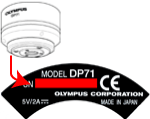
- Device Driver Installation procedure
- Double click the file [MALAD0403x64.exe] you saved in the folder in above procedure [2. Download] to open it. The file related with the device driver can be extracted.
- In the [Device Manager], select the [Other devices] and select the [Update Device Software]. Select the folder which is exacted at 2), and then follow the messages to install the device driver.
- Read installation details.
-
If the installation of the device driver is not finished correctly and the exclamation mark

- DP-BSW or DP2-BSW Installaiton Procedure
- Install the [DP-BSW Ver3.3] or [DP2-BSW Ver.2.1 or later] after installation of the device driver.
- * The software cannot be installed unless the user account is registered as a "Computer Administrator".
If the user account is registered as a "Restricted Account", change it to a "Computer Administrator" account.
(For the user account registration, refer to the instruction manual for your PC.)
言語
ファイルサイズ
ダウンロード