cellSens V4.2 64bit Installer
This is the updater for imaging software cellSens to V4.2 (for 64bit PC).
Release Notes
1. Important notice for update
- Please confirm whether update for your cellSens is free of charge in the following webpage.
https://licenseinformation.olympus-sis.com/
If update is not free of charge, purchasing update license provides access to the latest version.
If you use cellSens V1.6 or older, please contact Olympus for assistance. - If you are using cellSens with IX83, it is necessary to update your IX83 software to the latest version
“IX83 software (IX3-BSW)”: - If you are using cellSens with BX63, it is necessary to update your BX63 software to the latest version
“BX63 software (BX3-BSW)”: - Support for the following Olympus legacy hardware is discontinued. Please do not update cellSens software if you are using following cameras.
: DP20, DP21, DP25, DP26, DP70, DP71, DP72, CC12Color View I, Color View II, Color View III, Color View IIIu, FView II, SC20 - Please keep your current cellSens installed in the PC before the execution of update.
2. Installation
- Before installation
This software comes with "OLYMPUS END-USER LICENSE AGREEMENT". Prior to downloading this software, please read OLYMPUS END-USER LICENCE AGREEMENT carefully. When downloading begins, it automatically assumes that you have agreed to terms and conditions in this "OLYMPUS END-USER LICENSE AGREEMENT". For operating configurations or license types, please refer to the page describing Product specifications. Please be sure to close all running software before downloading. -
Procedure to download files
(1) Confirm that the version of your Windows OS is 64bit version. Select the file you want to download from the right side of the page.
* Download file name: cellSens V4.2_64bit_Build 28604.zip (7.16GB)
(2) When an entry form appears, enter all required items.
* The Serial Number means a "Serial Number" described in the main license card.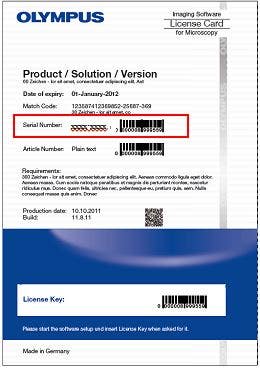
-
Installation procedures
(1) Decompress the downloaded zip file. (The file name differs depending on the version.)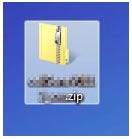
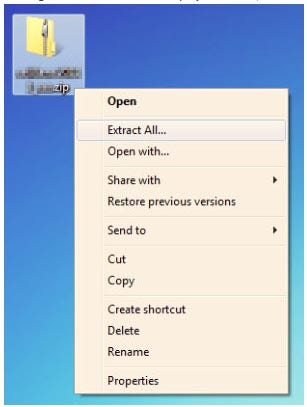
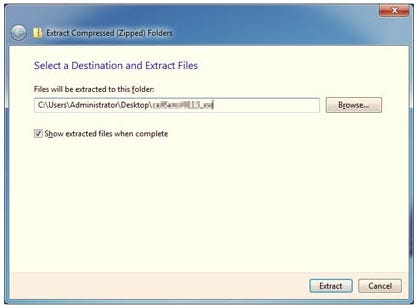
* Please refer to the installation manual for installation details. The installation manual is stored below the extracted folder.
\cellSens V4.2_64bit_Build 28604\Shared\Manuals\cellSens\English\Install_cellSens_en.pdf
* You cannot install the software unless the user account is registered as "System Administrator".
If your account is registered as "Limited account", please ask "System Administrator" to change. (For user account registration, please refer to the user manual of your computer.)
* Please be sure to read OLYMPUS END-USER LICENCE AGREEMENT and Notice before downloading.
* Before downloading, the form to enter required items appears
语言
文件大小
下载
Multilingual (/zh/.downloads/download/?file=855642730&fl=C)