DP2-TWAIN for Windows OS V10.5 Installer
General
This software is the installer of DP2-TWAIN Ver.10.5.
This software will also update earlier DP2-TWAIN versions to Ver.10.5, that are already installed on the system.
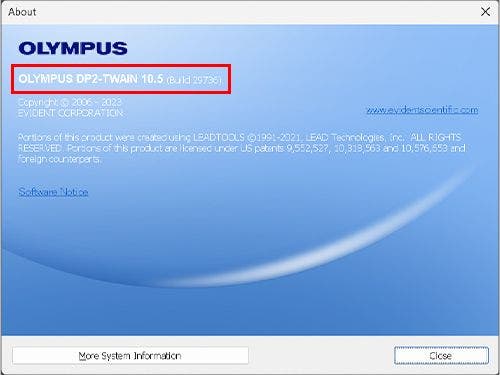
To check your current version of DP2-TWAIN, start DP2-TWAIN and Click on [Help] in the menu bar and choose [About]
![To check your current version of DP2-TWAIN, start DP2-TWAIN and Click on [Help] in the menu bar and choose [About]](./media_1b991aa3a871b0eae32942c685c4fe3e8e9a6f8e7.jpg?width=750&format=jpg&optimize=medium)
The currently installed version is shown.
Main additions / changes of DP2-TWAIN V10.5
- Added DP75 support
- Note: support for the following Olympus legacy cameras has already been discontinued with DP2-TWAIN V10.2.1. Please do not update your software installation if you plan to continue to use the following cameras: DP21, DP26, DP72, DP80
Installation procedure
Before installation
- Before installation
This software comes with an "END-USER LICENSE AGREEMENT". Prior to downloading the software, please read the "END-USER LICENSE AGREEMENT". When downloading begins, it automatically assumes that you agreed to this AGREEMENT. - Administrator
The software cannot be installed unless the user account is registered as "Computer Administrator". If the user account is registered as a "Restricted Account", change it to the "Computer Administrator" account. (For the user account registration, refer to the instruction manual for your PC.)
* Exit out of all applications running before you update the software.
System Requirements
Operating System:
Microsoft Windows 10 - 64 Bit
Microsoft Windows 11 - 64 Bit
CPU:
Intel® Xeon, Intel® Core i5, i7, i9 or equivalent (4 or more physical CPU cores recommended)
Memory:
8 GB RAM or more (dual channel recommended)
Display monitor:
1280 x 1024 pixel resolution (1920 x 1080 pixel or higher recommended) with 32 bit true colors
Interface:
depending on camera model
Download
- Click the [Download] button at the top of this page.
*Download file name: [DP2-Twain V10.5 for Windows OS.zip] (approximately 500 MB) - When an entry form appears, enter all required fields.
- Click the [Download] button to start downloading.
Software installation
1) Double-Click the [setup] file in decompressed folder [DP2TWAIN V10.5].
![1) Double-Click the [setup] file in decompressed folder [DP2TWAIN V10.5].](./media_1cafa512553915e12f50665479b0138a3297c0fb9.jpg?width=750&format=jpg&optimize=medium)
2) Select [Yes] when the [User Account Control] dialog box is displayed.
![2) Select [Yes] when the [User Account Control] dialog box is displayed.](./media_131327064231edbee23ff9c9d676c7ab1057d8bd9.jpg?width=750&format=jpg&optimize=medium)
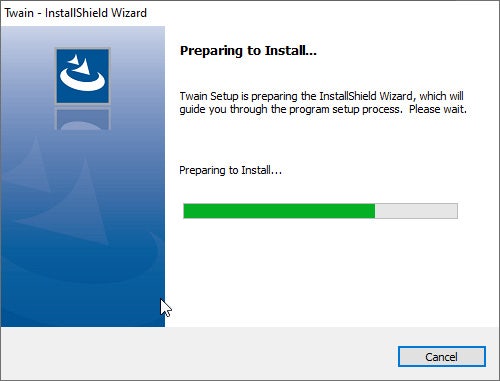
3) The Setup program of this software will start.
4) [License Agreement] will appear. Read the "EVIDENT END-USER LICENSE AGREEMENT". If you agree, select [Yes] and click the [Next] button.
![4) [License Agreement] will appear. Read the EVIDENT END-USER LICENSE AGREEMENT. If you agree, select [Yes] and click the [Next] button.](./media_1f48e8c89d6962458cc6386f2ff6abccefdc9f224.jpg?width=750&format=jpg&optimize=medium)
5) [Language settings] will appear. Choose a language provided by drop-down menu and click the [Next] button.
![5) [Language settings] will appear. Choose a language provided by drop-down menu and click the [Next] button.](./media_104580e8d03e981c425cb1b07c444f3aec0cfe233.jpg?width=750&format=jpg&optimize=medium)
6) [Customer Information] will appear. Enter the user's information and click the [Next] button.
![6) [Customer Information] will appear. Enter the user's information and click the [Next] button.](./media_1920b844dc7c1041d9b9c5f952966d1da5e5b00e2.jpg?width=750&format=jpg&optimize=medium)
7) Select the camera(s) you want to use.

8) [Choose Destination Location] will appear. If you need to change the location for DP2-TWAIN installation, click the [Browse...] button and select the desired folder. Click the [Next] button.
![8) [Choose Destination Location] will appear. If you need to change the location for DP2-TWAIN installation, click the [Browse...] button and select the desired folder. Click the [Next] button.](./media_190a029d5940422f865bbef7bcfc1f336c8118506.jpg?width=750&format=jpg&optimize=medium)
9) [Select Additional Tasks] will appear. Un-check Add manuals shortcut to the desktop if a shortcut is not required. Click the [Next] button to start installation.
![9) [Select Additional Tasks] will appear. Un-check Add manuals shortcut to the desktop if a shortcut is not required. Click the [Next] button to start installation.](./media_1a6c87dc72621d21c99e3f4882dadd17650696083.jpg?width=750&format=jpg&optimize=medium)
10) [Start Copying Files] will appear Click the [Next] button to start installation.
![10) [Start Copying Files] will appear Click the [Next] button to start installation.](./media_1ea46ee8e489f1c2dd8ad6fb4caee1cd78671b28e.jpg?width=750&format=jpg&optimize=medium)
11) The Setup program of this software will start.
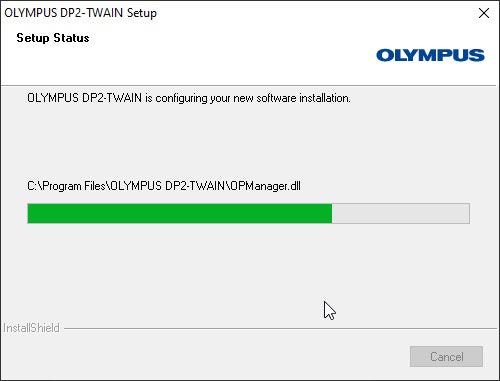
12) When installation is successful, click the [Next] button
![12) When installation is successful, click the [Next] button](./media_10f841167b63eb867c13e581c4e34a5db387becaa.jpg?width=750&format=jpg&optimize=medium)
13) [Connect Devices] will appear. In case you wish to install a FireWire device, pleas connect it to the computer, power it on, and carry on by clicking the [Start Configuration] icon. Else wise you can click on [Cancel]. The [Setup] window will close, the installation is completed.
![13) [Connect Devices] will appear. In case you wish to install a FireWire device, pleas connect it to the computer, power it on, and carry on by clicking the [Start Configuration] icon. Else wise you can click on [Cancel]. The [Setup] window will close, the installation is completed.](./media_1a78ea1b9056ee826ffacfbb9fc83fe979a73b715.jpg?width=750&format=jpg&optimize=medium)
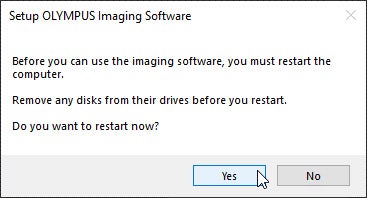
14) Please restart the PC before using the software for the first time.