CM30 Cell Culture Monitoring System
Remotely monitor, analyze, and share your cell cultures’ health, cell count, and confluency using the reliable quantitative data provided by the automated CM30 incubation monitoring system. The system enables label-free observation, reduces the risk of damage to your cultures, and standardizes your culture workflow.
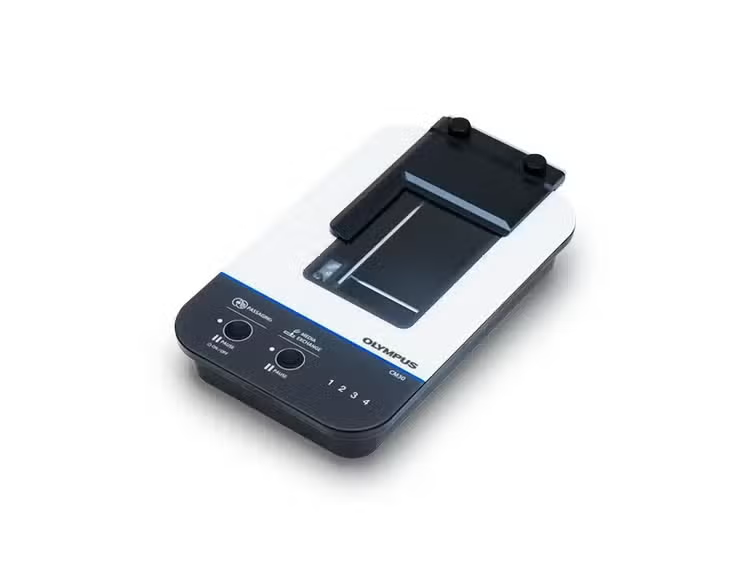
CM30 Cell Culture Monitoring System
Control Your Process with Smart Cell Culture Monitoring
Culturing cells can be costly, complicated, and time-consuming. With the CM30 incubation monitoring system, there’s a simple way to improve your culture process.
Application Gallery
The CM incubation monitoring system supports the observation and data analysis of various cells and vessels.
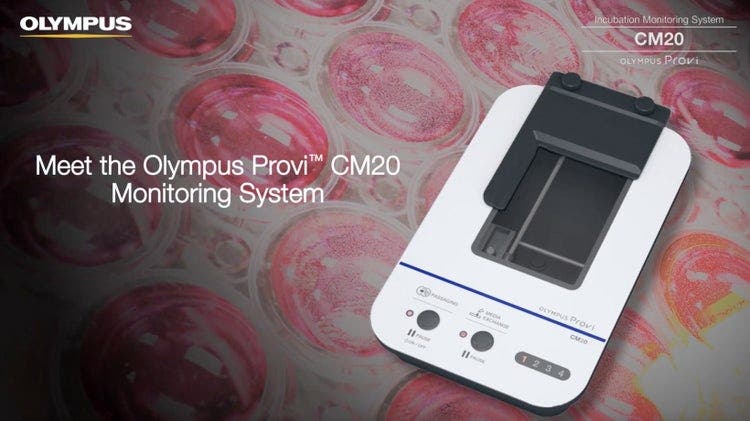
Improve the Cell Culture Process—Label-Free, Quantitative Results
Label-Free Cell Monitoring
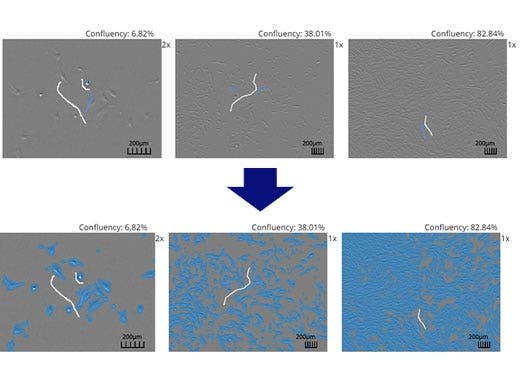
With the CM30 system, there is no need to stain the cultures to monitor their status. It acquires quantitative data from label-free cells, reducing the chance of harm to your cultures.
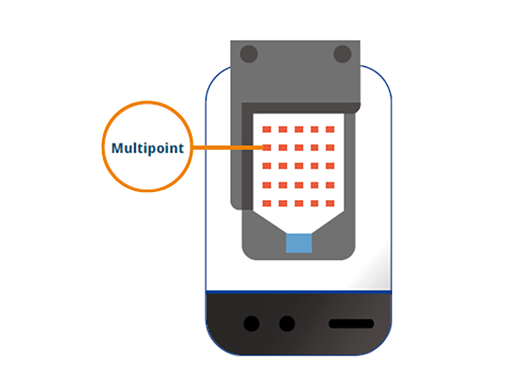
Multipoint Cell Culture Monitoring
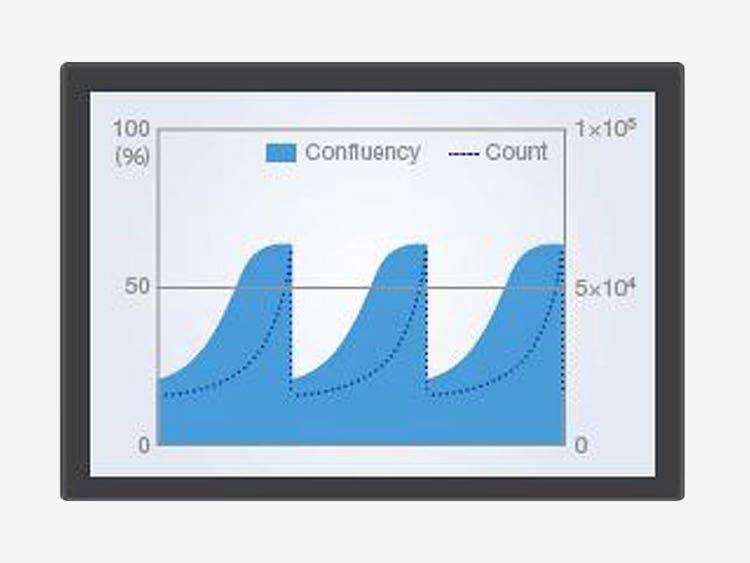
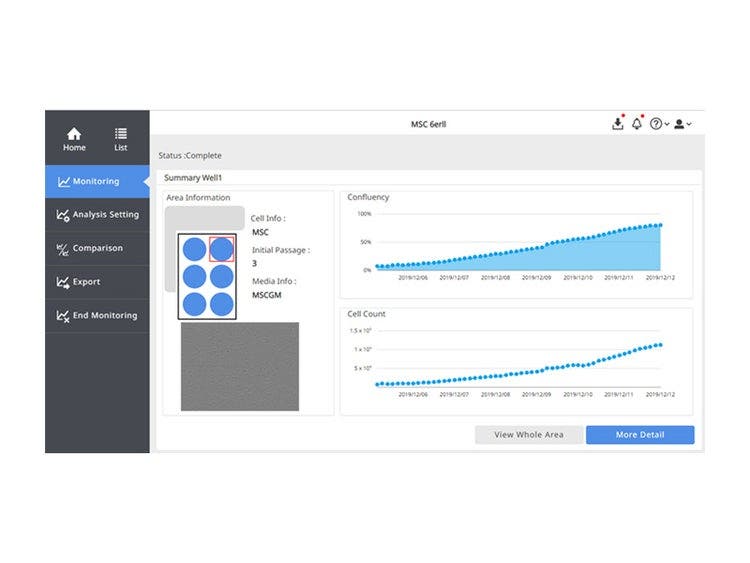
The system automatically scans multiple points in your culture vessel, providing periodic quantitative data about the health and confluency of your cultures.
Consistent Results Throughout Your Lab
Constant Analysis Parameters
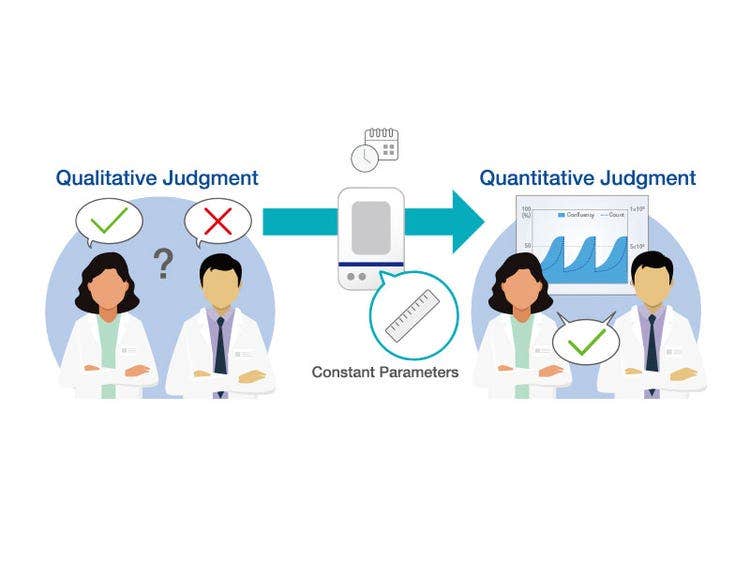
The CM30 system uses image analysis technology based on machine learning to continuously measure and analyze the images acquired. Constantly visualizing the culture status as a quantitative value eliminates factors that cause variations in cell checks and contributes to the reproducibility and consistency of experiments.
Compare Data Across Multiple Samples
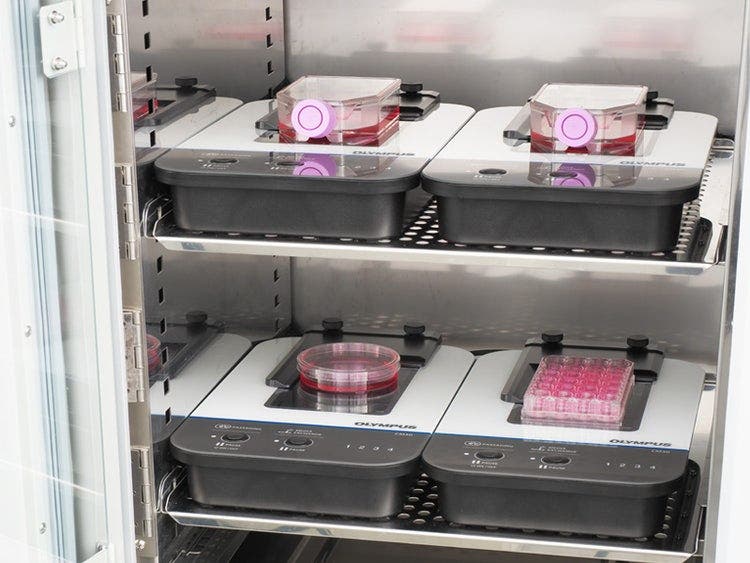
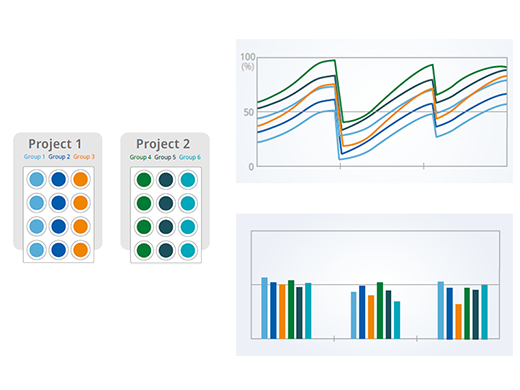
Using multiple heads helps you maintain a control sample while multiple test protocols run at the same time. Share your data with team members or compare it to past data.
Customize the Analysis Parameters to Suit Your Experiment
The CM30 system automatically performs confluency, cell counts, and colony counts from acquired images. You can configure the system’s analysis parameters to suit each cell culture’s conditions, such as cell type, culture conditions, or drug administered. Knowing the stepwise cell culture status at each timing improves the accuracy of the experiment.
Cost Effective
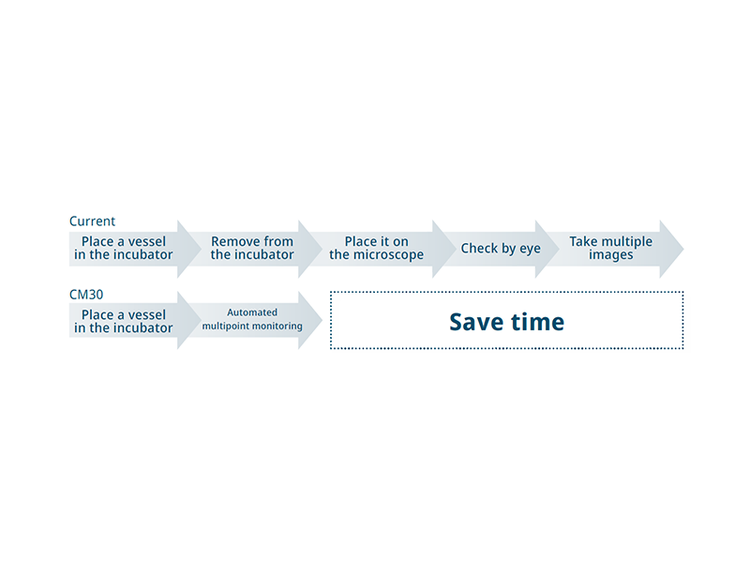
Save Time with Automation
Improve your traditional microscopy-based workflow and get more accurate results in less time. By automating cell culture monitoring using the CM30 system, you can expand your research and use your time more effectively
No Need to Enter the Clean Room for Monitoring
Every time you enter the clean room, there is an operational cost for consumables and measurements. Now, you no longer constantly need to check cell culture status outside the incubator. You can reduce your costs by remotely checking the status of your cultures from outside the lab.
Accurately Time Cell Passage
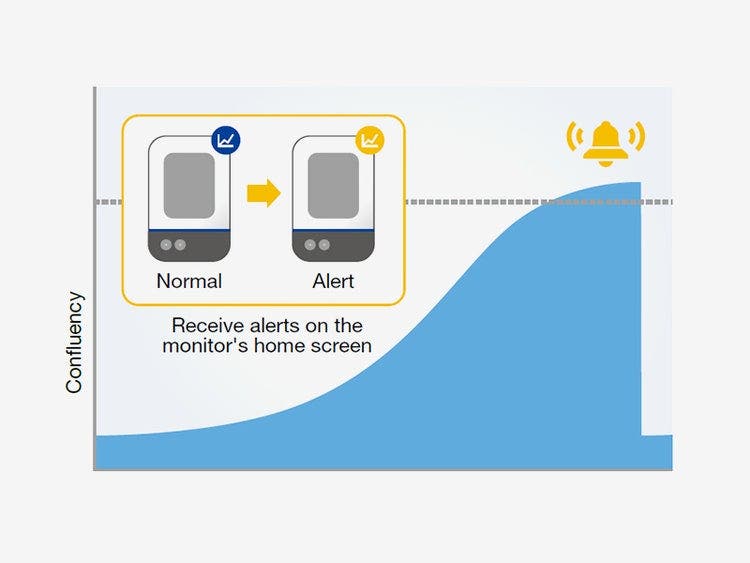
Time cell passages consistently and without the subjectivity associated with manual counting. Based on your set standardized parameters, the software can indicate when your cells are ready for passage, helping prevent failures.
Testimonials

Dr. Tadayuki Tsujita
Saga University
Biochemistry Lab, Faculty of Agriculture
One of our research themes is developing novel hypoxic stress protection compounds. In order to validate the compound treatment, we were struggling to observe cell morphology and growth data without disturbing the continuous low oxygen environment. This is critical to analyzing super-short half-life proteins. We tried to several equipment combinations to solve this difficulty.
In this time, we selected the CM30 system because it is compact and can be installed in our hypoxic incubator. It enables us to obtain experimental data such as serial dilution in multi-well plates in real time. The CM30 does not required mechanical moving to monitor all of the wells while maintaining hypoxic conditions, which had been difficult in the past. In addition, by connecting online, we can remotely observe the state of the cells from the outside, which we expect will be useful for troubleshooting.

Takanori Takebe, Dr.
Institute of Science Tokyo, Graduate School of Medical and Dental Sciences, Medical and Dental Sciences, Division of Advanced Therapeutic Sciences
Numerous researchers may be curious about the biological mechanisms involved in the long-term culturing required for the formation of stem cells and organoids within an incubator. I was honestly surprised that such a simplistic microscope is poised to address these questions as this CM20* can visualize spheroid formation and organoids cultured in an extracellular matrix gel with amazing contrast. I believe that CM20 can be a transformative tool in a wide range of cell biology experiments.

Erik A. Blackwood, Ph.D.
Translational Cardiovascular
Research Center University of Arizona
Dr. Erik Blackwood and his team have implemented the CM20* incubation monitoring system to optimize their cell culture monitoring process. They use the system to determine when cell lines are ready for their preclinical trials in rodent models for heart failure. Their approach focuses on identifying small molecule drug-based therapies, but also on gene therapy approaches. The count and confluency calculation capabilities of the CM20* system enable the researchers to monitor the effects of these therapeutics on iPS (induced pluripotent stem) cell lines in real time while the cultures remain safely in the incubator. Utilizing the system’s automated data gathering functions also increases their workflow efficiency.
Learn how Dr. Blackwood and his team improved their cell culture workflow with the CM20* monitoring system.

Interstem Co., Ltd.
Mr. Yoshihito Tachi
Applied Technologies
Leave Your Cultures in the Incubator
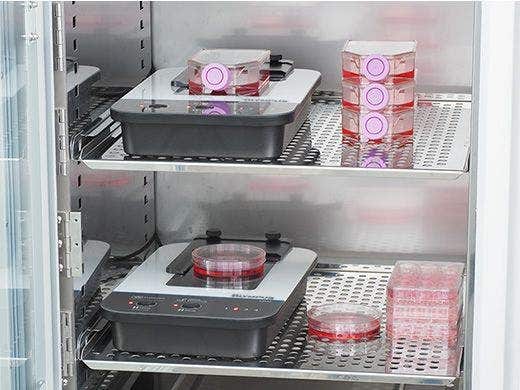
The monitor lets you track the health of cell cultures without removing them from the incubator, reducing the risk of contamination or damage from temperature changes and vibration. Its unique design enables you to fit up to four head units inside a standard incubator for greater efficiency.
Flat Design Accommodates Various Vessels
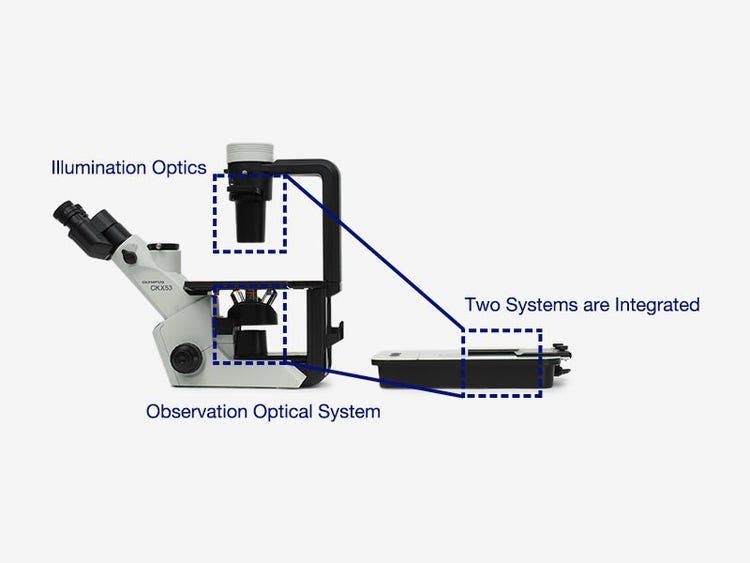
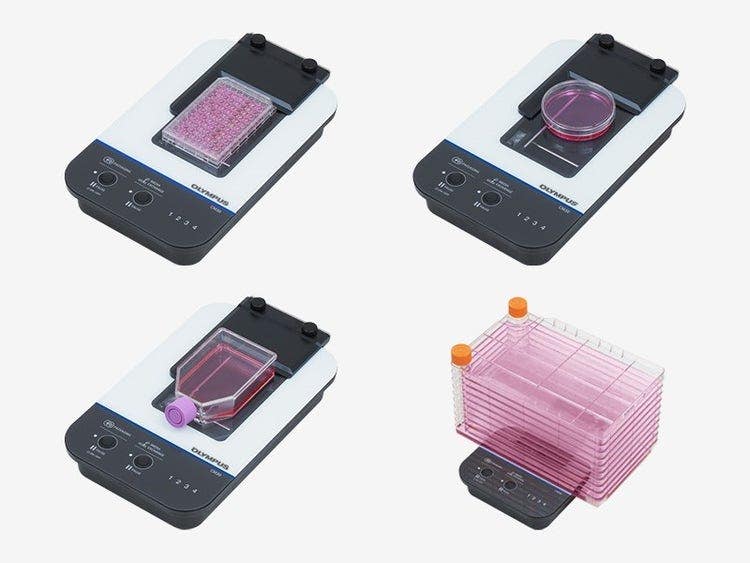
Evident's epi-oblique optical system enables the CM30 incubation monitoring system to have a compact, flat design that accommodates most standard cell culture vessels. Simply place the culture vessel you normally use on the CM30.
AI-Driven Automated Cell Analysis
By training the system to distinguish between the cells and background using machine learning, it can automatically determine confluency.
Reproducible, Comparable Data
The CM30 makes it easy to store and share detailed quantitative records of cell growth and health.
- Graph confluency data to look at cell counts and colony analysis in chronological order to see how they’ve changed over time
- The comparison function makes it simple to compare current data with past results or to compare between wells
- Enables you to quickly calculate cell characterization data, such as doubling time and the population doubling level (PDL)
Customize the Settings to Meet Your Needs
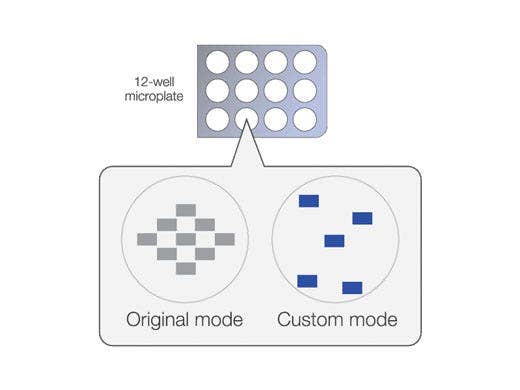
Monitoring points
Set the monitoring points in the vessel and well plate anywhere you would like, as shown in the vessel on the right. By specifying the rows and columns, you can set multiple points at once.
Focus position
Freely set the focus position for each monitoring point.
Monitoring time
Freely set the start time and interval time.
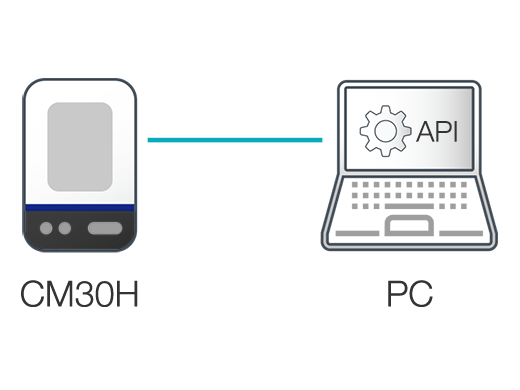
Application Programming Interface (API)to Freely Control the Acquisition Parameters (β ver.)
Remote, independent control of the CM30 head to:
Set key parameters
- Illumination
- Stage (XY, Z)
- Focus(autofocus/ manual focus)
- Exposure and image capture
Image Capture and Acquisition
- Static image capture
- Live preview
- Acquire and delete image data
- Obtain the list of images
IQ/OQ Validation Service
Our world-class support team can help you integrate the CM30 incubation monitoring system into your lab. IQ/OQ validation services are also available.

FAQ
Functions & Specifications
Yes. The CM30 is compatible with the following vessels:
- Petri dishes (90 mm and 100 mm)
- Microplates (6 well, 12 well, 24 well, 48 well, 96 well)
- Flasks (T25, T75, T80, T150, T175, T225)
- Multi-layer flask
Yes. The head can be sterilized using:
- Hydrogen peroxide (H 2 O 2 ) gas sterilization
- Autoclave sterilization (for vessel holder and sponge rubber only)
- UV ray sterilization
Disinfected using:
- Peracetic acid disinfection (cold sterilant)
- Alcohol disinfection
Support
Release Notes
CM30 Release Notes
The CM30 incubation monitoring system has been updated with bug fixes and feature enhancements. Please find the details of the updates below.
New Features/Improvements
- Removed the Olympus logo and replaced it with the Evident logo.
- Added a feature that allows automatic termination by setting the imaging period when creating a project.
- Enabled selection of high-quality and low-quality imaging in Custom Project Setting.
- Fixed an issue where the log download feature did not work.
CM30 Version 2.2.6
The CM30 incubation monitoring system has been updated with bug fixes and feature enhancements. Please find the details of the updates below.
New Features/Improvements
- Updated PC configuration (CPU, OS, BIOS) to support the latest environment.
- Improved the Vessel Create function so that Vessels with the same name are now correctly displayed and managed in the list.
- Refined the behavior after navigating to the Vessel Create screen to improve overall stability.
- Updated the user manual to reflect the latest functions and operating procedures. The manual can be accessed from the Help menu.
- Increased the maximum number of concurrent users from 4 to 50.
CM30 Version 2.2.5
The CM30 incubation monitoring system has been updated with bug fixes and feature enhancements. Please find the details of the updates below.
New Features/Improvements
- Updated PC configuration (CPU, OS, BIOS) to support the latest environment.
- Disabled OLSC service settings in the configuration screen following the discontinuation of the service.
- Optimized the display of the Doubling Time label, improving data visibility.
- Adjusted the behavior of well plate well number pop-ups to ensure consistent display.
- Improved Z-position setting accuracy in Custom Mode MF, enhancing positioning precision during project execution.
- Optimized the GUI layout of the Area Select screen when selecting 48-well plates or higher, enhancing visibility and usability.
- Refined log management functionality to maintain output within appropriate limits, improving performance and system management.
- Updated the user manual to reflect the latest features and operating procedures. The latest version is available through the help menu.
CM30 Version 2.2.4
The CM30 incubation monitoring system has been updated with bug fixes and feature enhancements. Please find the details of the updates below.
New Features/Improvements
- To address vulnerabilities in Java 7 and Java 8 (JDK 1.7 and JDK 1.8), the system has been updated to Java 21, improving security and performance.
- The user manual has been revised to correct minor inaccuracies. The latest version of the manual is available through the help menu.
- Fixed an issue where loaded Colony analysis parameters could not be saved.
- Resolved an issue where the UI would freeze when selecting "ME" in the "Select Passage" option of the Comparison feature.
Improvements
- Fixed a problem with ‘the Z focus position at image acquired in the project execution’ being different from 'the Z focus position in the initial settings', When the manual focus is selected in custom mode.
CM20H API Release Notes
Application Program Interface (API) which allows you to freely control the monitoring head CM20H/CM30H from your PC without the incubation monitoring station. Release note in the download package provides further details.
New functions/Improvements
- Upgraded runtime to the latest version of .NET 8.
- Changed the recommended system requirements to Windows11.
- Removed Windows 10 from the recommended system requirements.
CM20H API for Linux Version 1.6.4
Application Program Interface (API) which allows you to freely control the monitoring station CM20H/CM30H from your PC or microcomputer board equipped with Linux without the incubation monitoring station. Release note in the download package provides further details.
New functions/Improvements
- Upgraded runtime to the latest version of .NET 8.
- Updated recommended device specification.
CM20H API for Linux Version 1.6.2
Application Program Interface (API) which allows you to freely control the monitoring station CM20H/CM30H from your PC or microcomputer board equipped with Linux without the incubation monitoring station. Release note in the download package provides further details.
New functions/Improvements
- Organized the folder structure.
- Improved the file naming convention of the distribution package.
- Updated the document format.
- Upgraded runtime to the latest version of .NET 8.
CM20H API Version 1.6.1 (Compatible with CM30H)
Application Program Interface (API) which allows you to freely control the monitoring head CM20H/CM30H from your PC without the incubation monitoring station. Release note in the download package provides further details.
New functions/Improvements
- Implemented function to get physical capture area dimension.
- Implemented function to get image data compression level.
- Implemented function to change image data compression level.
- Added a parameter to the Stage Move APIs to allow the API to wait for the move to complete.
- Changed runtime from .NET 6 to .NET 8.
CM20H API for Linux Version 1.6.1 (Compatible with CM30H)
Application Program Interface (API) which allows you to freely control the monitoring station CM20H/CM30H from your PC or microcomputer board equipped with Linux without the incubation monitoring station. Release note in the download package provides further details.
New functions/Improvements
- Implemented function to get physical capture area dimension.
- Implemented function to get image data compression level.
- Implemented function to change image data compression level.
- Added a parameter to the Stage Move APIs to allow the API to wait for the move to complete.
- Changed runtime from .NET 6 to .NET 8.
- Updated recommended Linux device specification.
CM20H API Version 1.4.1
Application Program Interface (API) which allows you to freely control the monitoring head CM20H/CM30H from your PC without the incubation monitoring station. Release note in the download package provides further details.
New functions/Improvements
- Runtime has been changed from .NET 5 to .NET 6.
- API Server works without redistributable package for Visual C++ 2013.
- API Server runs with default configuration parameters when “apiserver.appconfig.json“ does not exist.
- Performance of live view API has been improved while power saving mode is disabled.
- User-defined values can be saved as metadata of captured images.
- Image list API provides metadata recorded in captured images.
- Position of Z-axis origin has been modified from the minimum position of focusing range to the stage top of monitoring head.
- Minor bugs are fixed.
CM20H API Version 1.3.1
New function/improvement
Application Program Interface (API) which allows you to freely control the CM20H from your PC without the incubation monitoring station. Release note in the download package provides further details.
- Connect incubation monitoring head to your PC, and following functions will be available.
- Set key parameters
- Illumination
- Stage (XY,Z)
- Focus (autofocus/ manual focus)
- Exposure and image capture
- Acquire images and data
- Static image capture
- Live preview
- Acquire and delete image data
- Obtain the list of images
- Set key parameters
- Information acquisition about the API server is available.
- Log data is available in the GUI window.
- API Server records a set of parameters as metadata in the image file. The metadata includes the position of stage and focusing mode when a still image is captured.
- Minor bugs are fixed.
Specifications
CM30H: Incubation Monitoring Head
(inside the incubator)
Applicable vessels
Rowspan=4
Optical performance
Rowspan=4
(image size per one shooting)
Sterilization resistance
Rowspan=3
Disinfection resistance
Rowspan=2
Incubation Monitoring Station
Software
Project setting
Rowspan=6
Analysis
Rowspan=3
Browsing
Rowspan=2
Export
Rowspan=2
Client PC (Recommended System Configuration for CM30 Software)
Operation Confirmed Incubator
Reference data:Remote and quantitative cell culture monitoring: Vero cells
Incubator conditions required for use of the CM30 system:
- The minimum height of the CM30H installation space must be 150 mm (6 in.)
- There must be an access port through which the CM30H cable can be taken out