SLIDEVIEW VS200 ユニバーサルスライドスキャナー
先端研究およびデジタル病理学向けマルチモーダルイメージング
SLIDEVIEW™ VS200 システムは、さまざまな倍率、柔軟なスライドサイズ、明視野から蛍光まで最大 10 種類の観察手法に対応し、幅広い標本や染色を撮影できるように設計されています。 高解像度でホールスライドを撮像することで、実験室は標本からより多くの知見を引き出すことができるようになります。
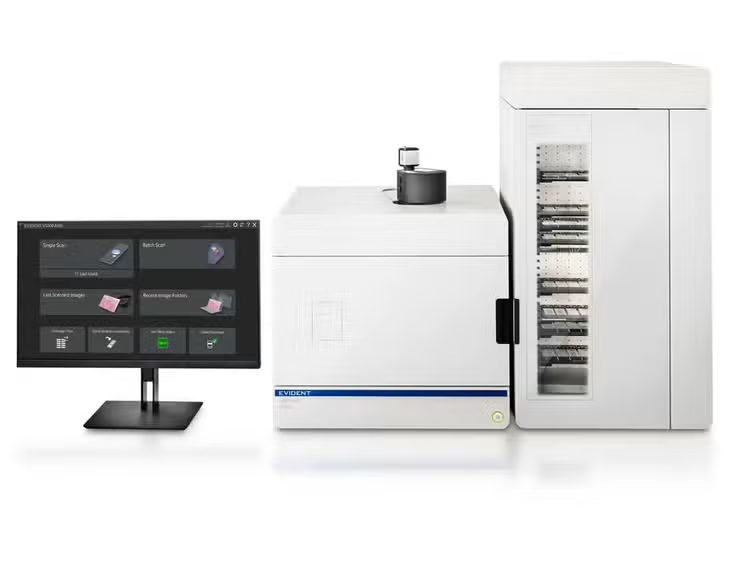
SLIDEVIEW VS200 ユニバーサルスライドスキャナー
アプリケーションを選択してください
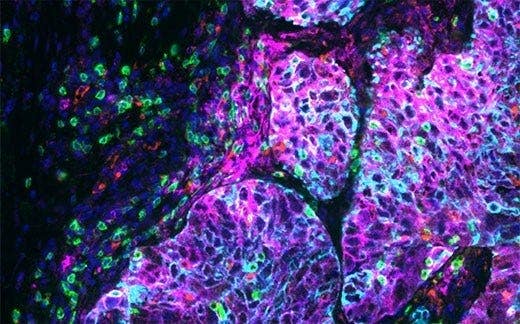
ライフサイエンス研究向けSLIDEVIEW VS200
SLIDEVIEW VS200 システムは、神経科学、癌および幹細胞、空間生物学などの高度な研究に高解像度のスライドスキャンを提供します。 10 種類の観察手法、マルチプレックス機能、複数のスライドガラスサイズおよび最大 100 倍の多様な倍率の対物レンズに柔軟に対応しており、定量分析に最適な高画質画像を提供します。
SLIDEVIEW VS200 デジタル病理学用
柔軟かつ直感的なスキャナーであるSLIDEVIEW VS200システムは、最小限のトレーニングでさまざまな種類のサンプルをデジタル化できます。 VS200システムは、多様なスライドスキャン、優れた画像品質、柔軟なオプションにより、デジタル病理ワークフローを改善します。
Key Benefits
More Insights from Every Slide
1台のスキャナーで全てのスライドをデジタル化します。柔軟なマルチモーダルイメージングに対応したスライドスキャナーで、必要な生物学的知見を取得します。
Melissa González
Manager, Digital Pathology Imaging and Image Analysis Core
Genentech
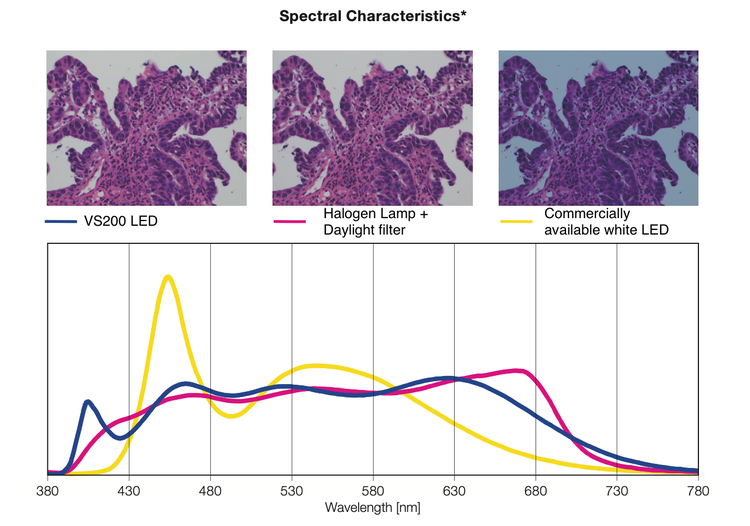
*このグラフは、視感度曲線を用いて正規化された各光源の分光特性を示しています。各光源の光の強さを比較するグラフではありません。
Confidence in Your Data Quality
最先端の光学技術の革新と自動化により高品質な画像取得を日常的な再現可能なものにし、異なる実験間やユーザー間の設定時間、ばらつき、ユーザー依存性を低減します。
Smarter Imaging and Workflow
直感的なインターフェース、強化されたバッチスキャン機能、より迅速なワークフロー、AI ベースのセグメンテーションツールにより、画像取得から解析までの工程を加速します。人的なミスや手作業が減ることで、より精度の高い解析結果を得ることができます。
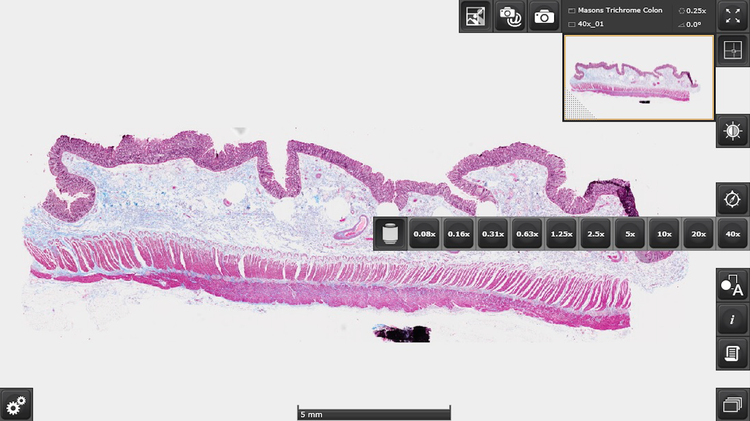
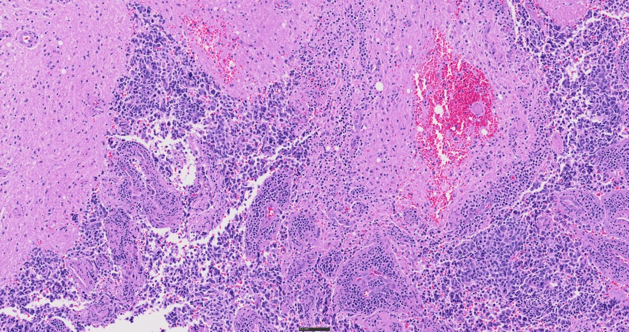
結腸(Masson’s trichrome染色)。
画像データ提供:Wenjin Chen, Rutgers Cancer Institute of New Jersey。
Centralized Image Access
スライドスキャナーによって取得された大量のデータの管理は、Net Image Server(NIS)SQL データベースとWebイメージビュアーによりこれまで以上に容易になりました。 スライドをスキャンして画像をデータベースに自動的にアップロードし、ユーザーごとに管理し、オフラインでの画像閲覧やアノテーションツールをご利用いただけます。
Specifications
| 仕様 | VS200 S6 | VS200 ローダー | |
| 対象標本 | 観察可能な標本 | カバーグラス付きスライドとカバーグラスなしスライド*1 | |
| スライドガラスのサイズ(幅×長さ×高さ) | 標準スライドトレイ: 25 mm~26.5 mm × 75 mm~76.5 mm × 0.9 mm~1.2 mm(1 インチ × 3 インチ × 0.05 インチ)(スライド 6 枚)オプショントレイ: 1) 47–50 mm × 27–30 mm × 1.2–1.6 mm(1インチ × 2インチ × 0.05インチ)(スライド3枚) 2) 51 mm–53 mm × 75 mm–76.5 mm × 0.9 mm–1.2 mm (2インチ × 3インチ × 0.05インチ)(スライド3枚) 3) 75 mm~76.5 mm × 100 mm~102 mm × 0.9 mm~1.2 mm(3 インチ × 4 インチ × 0.05 インチ)(スライド 1 枚) 4) 100 mm~102 mm × 126 mm~128 mm × 1.1 mm~1.4 mm(4 インチ × 5 インチ × 0.06 インチ)(スライド 1 枚) |
||
| カバーガラスの厚さ | 0.12 mm~0.17 mm | ||
| 観察方法 | 明視野、明視野モノクロ、反射明視野(オプション*2)、暗視野、位相差(オプション*3)、線偏光(オプション*4)、円偏光(オプション)、DIC(オプション)、蛍光(オプション)、スペックル照明による蛍光光学断層撮影(オプションの VS-SILA モジュール) | ||
| 光学フレーム | 照明装置 | 透過光用のケーラー照明を内蔵、高輝度・高演色LED(最大50,000時間) | |
| 対物レンズ | 2 倍、4 倍*5、10 倍*5、20 倍、40 倍*5 60 倍*5、および100 倍*5に対応した対物レンズ(選択されたオイル浸、シリコンオイル浸、位相差対物レンズを含む)を搭載可能な 6 ポジションモーター駆動式ノーズピース用。オプションで自動液体ディスペンサーも利用可能 | ||
| 電動ステージ | 自動制御XYステージ | ||
| 自動制御付き電動フォーカス | 自動制御付き電動フォーカス | ||
| カラーカメラ | 内蔵型2/3インチCMOS、3.45 μm × 3.45 μmピクセルサイズ、高感度・高解像度 | ||
| スキャンユニット | 収容数 | 1 枚スライドトレイ。最多 6 枚。複数トレイローダーモードにアップグレード可能 | 最大35枚のスライドトレイで、合計210枚のスライドまで対応可能 |
| ピクセル解像度(カラーカメラ) | カラーカメラ UPLXAPO20X(NA 0.8): 0.274 μm/ピクセル オプション: UPLXAPO4X(NA 0.16): 1.37 μm/ピクセルUPLXAPO10X(NA 0.4): 0.548 μm/ピクセルUPLXAPO40X(NA 0.95): 0.137 μm/ピクセルUPLXAPO40XO(NA 1.4): 0.137 μm/ピクセルUPLXAPO60XO(NA 1.42): 0.091 μm/ピクセルUPLXAPO100XO(NA 1.45): 0.055 μm/ピクセル 最大35枚のスライドトレイで、合計210枚のスライドまで対応可能 モノクロカメラ Hamamatsu ORCA カメラ UPLXAPO4x(NA 0.16)1.625 μm/ピクセル UPLXAPO10X(NA 0.40)0.650 μm/ピクセル UPLXAPO40X(NA 0.95)0.163 μm/ピクセル UPLXAPO40XO(NA 1.4)0.163 μm/ピクセル UPLXAPO60XO(NA 1.42)0.108 μm/ピクセル UPLXAPO100XO(NA 1.45)0.065 μm/ピクセル |
||
| スキャン時間 | 明視野: 約1.5分(20倍対物レンズ、スキャン領域15mm×15mm) 蛍光広視野NOVEM: 約14分 20倍対物レンズ、スキャン領域15 mm × 15 mm、4チャンネル、各50 msの露出 |
||
| ソフトウェア | 自動サンプル検出(汎用およびTruAIディープラーニング)、自動バーコード読取、自動フォーカスマッピング、自動スキャン、自動ステッチ、一時停止および再開スキャン、Zスタックイメージング、拡張フォーカスイメージング(EFI)、画像形式: VSI、JPEG、TIFF、DICOM、同期マルチ画像表示、無段階ズーム、スキャン中のズーム、注釈、スクリーンキャプチャ、スライドローダー制御(マルチトレイローダーのみ) | ||
| 蛍光 (オプション) |
蛍光コンポーネント | UPLFLN4X 対物レンズ(概要用推奨)、フライアイレンズ付き照明装置、電動ミラータレット、電動フィルターホイール。広視野光源オプション: U-LGPS、エクセリタスX-Cite XYLIS-2、X-Cite NOVEM、KL2500LED、CoolLED pE-10 VS-SILA: 最大6ラインのレーザーコンバイナおよびスクランブラユニット |
|
| モノクロカメラ | オプション: VS-304M(12-bit)、1インチCMOS、3.45 μm × 3.45 μm画素サイズ(12MP) HAMAMATSU ORCA Flash(16ビット)4.0 V3 HAMAMATSU ORCA Fusion(16ビット) HAMAMATSU ORCA Fusion BT (16ビット) |
||
| スキャナ用ソフトウェア向けソリューション(オプション) | ソリューションライセンス | バッチ画像フォーマットコンバーター 蛍光画像用 DICOM コンバーター VS-SILA 取得 Net Image Server (NIS) SQL |
|
| デスクトップソフトウェア(オプション、分析専用の独立ソリューション) | ソリューションライセンス | バッチ画像フォーマットコンバーター DICOM コンバーター 検出・解析 ディープラーニング 3D デコンボリューション |
|
| 環境 | 重量 | 光学フレーム: 75 kg(165.3ポンド) スライドトレイ 1 個: 0.6 kg(1.3ポンド) | 光学フレームとマルチトレイローダー: 149 kg(328.4 lb)、スライドトレイ 35 個: 21 kg(46.3ポンド) |
| 蛍光: 8 kg(17.6 ポンド) PCとモニター: 19 kg(41.9 ポンド) カメラカバー(オプション): 9 kg(19.8 ポンド) |
|||
| 動作環境 | コンピューターとモニター: 19 kg(41.9 ポンド) カメラカバー(オプション): 9 kg(19.8 ポンド) |
||
| 動作環境 | 温度: 15~28 °C(59~82.4 °F)(他のデバイスを含む) 湿度: 最大80%(31℃(87.8℉)) |
||
| 消費電力 | 221 W | ||
| 電源 *5 | 入力: 100~240 V AC、50/60 Hz、4 A 出力: 24 V DC、9.2 A | ||
| ソフトウェ ア統合 |
互換性のある解析ソフトウェア | Visiopharm、Indica Labs、Andor/Imaris、Fiji、QuPath、Media Cybernetics、Applied Spectral Imaging、Proscia、Inspirata、Corista、MindPeak、Patholytix、HistoMetrix | |
※1 オプションの対応する対物レンズが必要です.
※2 オプションの光源、電動蛍光ミラーターレット、ミラーユニットが必要です.
※3 オプションの位相差対物レンズが必要です.
※4 オプションのアナライザーミラーユニットと電動ミラーターレット、または手動回転式アナライザーが必要です。
※5 別売りです。
Release Notes
バージョン 5.1+ サービスアップデート1
新規ハードウェア対応
- CoolLED pE-10
- CoolLED pE-800
- 1 x 2 インチトレイ
新機能と改良点
- 新しいアイコンと縦横タブを備えた刷新されたユーザーインターフェースにより、ナビゲーションが容易に
- スキャンプロジェクトの検索が可能
- 1つのワークフローで複数の詳細スキャンを実行できる、新しいマルチスキャンプロジェクト機能
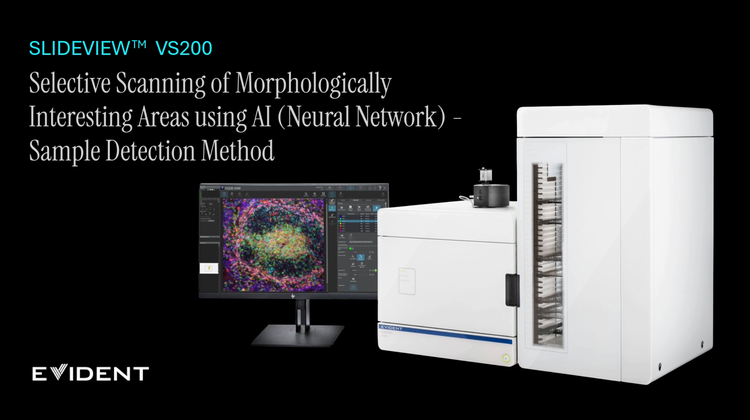
- 初回の詳細スキャン時にAIによるサンプル検出を実行
- 概要画像で取得したAF結果をバッチモードで活用
- バッチスキャン時に手動フォーカスが可能で、フォーカス位置も記録
- バッチスキャン完了後、任意のスライドを選択して再スキャンが可能
- チャンネルごとの取得およびアライメント(通常・マルチプレックス)に対応
- スキャンウィザードで蛍光観察の疑似カラーを設定可能
- マルチプレックスアライメント調整のアルゴリズムを改良
- タイルビュー上で蛍光チャネルとともに任意の透過光チャネルを表示可能
- ソフトウェアで再度開いても画像の回転状態を保持
- オイルディスペンサーのメンテナンスを通知するリマインダー機能を搭載
- Net Image Serverの認証において、従来のSQLおよびWindowsアカウントに加えMicrosoft Entra ID(MFA認証)に対応
- OlyVIA Web Viewerで作成したアノテーションをOlyVIA Desktopでも表示可能
解決された技術的問題
- ステージナビゲーターが時々動作しない
- 特殊なシェーディング補正キャリブレーションは、現在のXY位置ではなく、キャリブレーションウィザードの最後のXY位置で行われます。
バージョン4.3(IVD)
VS200 ASWソフトウェア バージョン4.3は、SLIDEVIEW DX VS200スライドスキャナーを制御するために使用。SLIDEVIEW DX VS200スライドスキャナーは、欧州IVDRに基づくCEマーキングを取得した機器であり、欧州における臨床診断に使用します。 本ソフトウェアは、研究用専用(RUO)ソフトウェアであるバージョン4.2を基にしています。
バージョン4.2との相違点
- 免責事項、ホームページ、オンラインヘルプに、体外診断用(IVD)互換ソフトウェア機能を説明する追加ページおよびリンクを設置。
- データベース機能なし
ライセンスに関する注意点
- RUOライセンスとIVDライセンスは独立しています。RUOソフトウェアを搭載したスキャナーをIVDバージョンへアップデートすることはできません。また、その逆も同様にアップデートすることはできません。
- VS200 DesktopおよびOlyVIA DesktopはRUO版であり、IVD認証を取得していません。
バージョン 4.3.1(IVD、サービスリリース)
改善点
- PACSへのアップロード時にDICOM画像を暗号化するオプション
- サイバーセキュリティ要件を満たさないファイルおよびライブラリの削除
解決された技術的問題
- 100件未満のスキャンプロジェクトが存在する場合、GUIが正しく表示されない問題
- スキャンウィザードの進行状況表示が実際のスキャン進行状況より遅れる
- FLチャンネルの一部のスライドプロパティが更新されません
- U-LGPSは正常に動作しません
- バッチスキャンまたはシャディング補正中にソフトウェアがクラッシュする問題
- 光学要素を取り外した後、ソフトウェアの再起動が必要な問題
- シングルトレイシステムでのトレイ交換時のエラー
- ソフトウェア再起動後にカラーカメラ設定がリセットされる問題
- ソフトウェアが完全にシャットダウンしない
- 異なるビット深度のレイヤーおよびJPEG圧縮を使用した場合、PACSへのDICOMアップロードに失敗する
- DICOM形式へのエクスポート時、ファイルサイズ制限のエラーメッセージに4 GBではなく2 GBと表示される
バージョン 4.2.1(サービスリリース)
改良点
- バーコード検出を改善するための追加オプション
- ファイル名において多チャネルスキャンを定義するためのセパレーターを追加
- VS-SILAスキャンにおける、より効率的なメモリの管理
- VS200 ASWおよびVS200 Desktopにおいて、トレーニングラベル作成用のツールウィンドウを追加
解決された技術的問題
- E:\ドライブによる起動問題
- 100件未満のスキャンプロジェクトが存在する場合、GUIが正しく表示されない問題
- 6ラインレーザーコンバイナー使用時の黒い画像タイルの問題
- NIインストーラーがPCのインターネット接続でのみ動作する問題
- 手動フォーカス時に「Device is Busy(デバイスがビジー)」の警告メッセージが表示される問題
- フォーカスポイントが不正確に計算される問題
- バッチスキャンまたはシェーディング補正中にソフトウェアがクラッシュする問題
- ソフトウェア再起動後にカラーカメラ設定がリセットされる問題
- 光学素子を取り外した後、ソフトウェアの再起動が必要な問題
- バージョン3.4.1で作成されたトレーニングラベルレイヤーがバージョン4.1.2および4.2で表示できない問題
バージョン4.2
- 新規ハードウェア対応
- VS-SILA 取得のため、最大 6 つの波長に対応し、395 nm から 785 nm までの広範囲の波長に対応
- U-LGPSタイプ2、各波長のオン/オフおよび出力を個別に制御可能
- 新型偏光角度チェンジャー(rev2)
- カバースリップなしのキャリブレーションスライド、すべてのカバースリップなし対物レンズに対応
- 新機能と改良点
- 自動Z範囲測定
- VS200 Desktopにおけるディープラーニングのアップデート(画像回帰、ラベリングの簡素化、即時トレーニング、cellSens 4.2提供の新しい事前トレーニング済みIHCネットワーク)
- VS200デスクトップでのオブジェクトカウント
- 画像エクスポートダイアログ(cellSens 4.2より)をすべてのVS200ソフトウェアに追加
- NISは、クラウド環境(Microsoft Azureでテスト済み)の仮想マシンに一定の制限付きでインストール可能
- 倍率をDICOMタグとして保存
- より多くの臨床関連情報をDICOMタグとして直接保存
- DICOMラベルの向きを、利用可能なPACSに適合するよう最適化
- 仮想Zスキャン、サンプル検出の改善、オートフォーカス最適化に関する新規ビデオチュートリアルをVS200 ASWソフトウェアのオンラインヘルプに追加
バージョン4.1.2
新機能と改良点
- サイバーセキュリティアップデート: CodeMeterをv7.60dに更新
- より多くのクライアントをサポートするためのNIS SQLとOlyVIA Webを最適化
- OIR形式をVS-CONVソリューションの入力形式としてサポートされています
バージョン4.1.1
新規ハードウェア対応
- VS-SILA取得用レーザーコンバイナー(405 nm、488 nm、561 nm、638 nm)
- U-LGPSファイバー光源
- 反射明視野用KL-2500
- VS-SILA取得用の光学セクショニング装置とトリガーボード
新機能と改良点
- 光学セクショニング用VS-SILAモジュール
- Windows 11でのVS200 ASW、NIS SQL、VS200 Desktop、およびOlyVIA Desktopのサポート
- 画像取得中に、追加の画像レイヤー(サンプルマスク、フォーカスポイント、フォーカスマップ、シャープネスレイヤー)をオプションで作成可能
- NIS SQLデータベースの資格情報マネージャーの統合
- 上部と下部: ライブモードでの仮想Z取得のための絶対Z範囲の定義
- DICOM蛍光スキャンの8ビット表示のみ可能なDICOMビューアの表示を最適化するための前処理
- OIRファイル形式をDICOMに変換する機能
- ROIの保存と読み込み機能
- MicroPDF417バーコードタイプ対応
- OlyVIA Webから画像ダウンロード機能
Resources
Application Notes
Insights
Videos
OlyVIA™ Webviewer で注釈を作成
データベースから画像をエクスポート
ホールスライド画像をより簡単に保存: Net Image Server SQL