Stream Enterprise Data Management Software
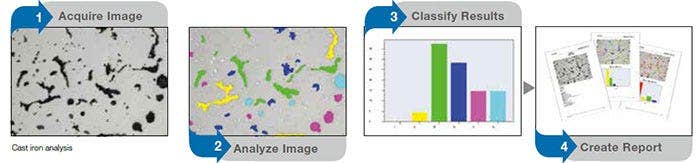
Stream Enterprise data management software offers intelligent step-by-step workflows to acquire sharp, crisp images that are ready for quantitative measurements and professional reporting based on the latest standards. Users of any experience level can conduct complex image analysis tasks, from image acquisition to standard reporting, under any imaging condition.
- Product Availability: This product has been discontinued check out our current product

Stream Enterprise
Fast, Efficient Inspection Workflows
Stream Enterprise data management software offers intelligent step-by-step workflows to acquire sharp, crisp images that are ready for quantitative measurements and professional reporting based on the latest standards. Users of any experience level can conduct complex image analysis tasks, from image acquisition to standard reporting, under any imaging condition.
Designed for flexibility, Stream Enterprise software has functions to conduct fast and precise observation sessions on a large variety of samples while maintaining data security and measurement reliability.
Optional solutions enable users to adapt Stream Enterprise software to their application, including quality analysis, research and development, process development, and quality control.
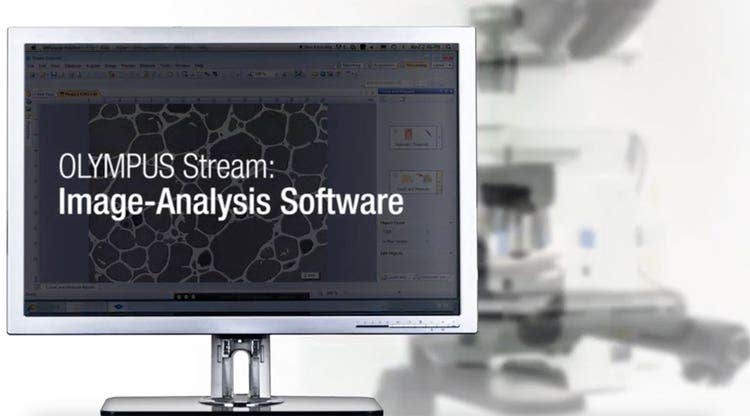
Image Capture and Hardware Support
All supported cameras—color, monochrome, IR, SWIR—are integrated into the software’s easy-to-use camera control, which also captures the magnification and calibration information. Acquiring large, all-in-focus images is easy using either a manual or motorized stage.
Measurement, Image Analysis, and Optional Advanced Imaging Solutions
The software enables you to make a variety of geometric measurements interactively or with advanced image processing and analysis capabilities. Standard compliant measurements can also be produced using the Material Solutions workflow. The software offers a variety of tools for various materials science analyses, so you can be confident in your results.
Data Storage and Sharing
The data are securely stored on the local network using client-server technology based on Microsoft SQL Server. User rights and data security can be enhanced with the Secure File Repository package.
Documentation
Powerful reporting tools are available that use Microsoft 365 with a direct connection to the database.
Try Stream Enterprise free for 30 days!
Click "Request a Demo" and note that you would like a 30-day license in the first box.
Easy-to-Use Interface and Step-by-Step Guidance
Smart Technologies for Crisp Image Capture
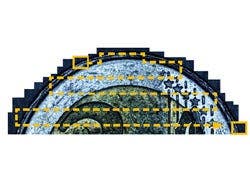
- Tools for live images
- Panorama and extended depth focus
- Saving and recalling acquisition settings
High Efficiency on Repeating Tasks
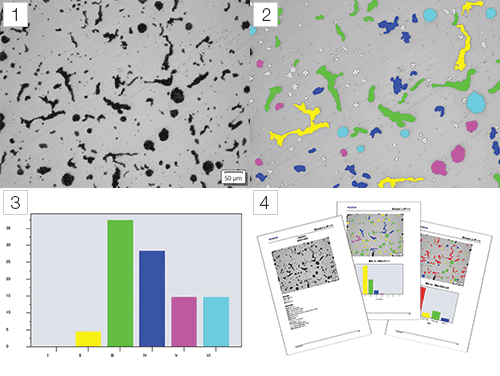
- Guided operation
- Quantitative analysis
- Automatic tools for efficient image acquisition
- Efficient report creation
Designed for Evident Hardware
Seamlessly Integration with Evident Optical Microscopes
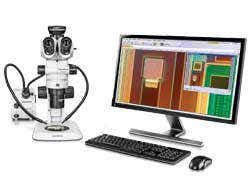
- Upright microscopes
- Inverted microscopes
- Semiconductor microscopes
- Stereo microscopes
- LEXT 3D measuring laser microscope
- DSX digital microscope
Working with Evident Digital Cameras
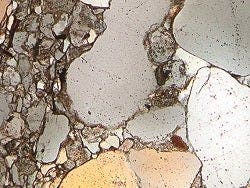
- Color fidelity
- High resolution
- Real-time on-screen imaging
Dedicated Observation Methods
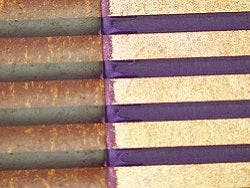
- HDR imaging for image contrast improvement
- Unique 'MIX' observation mode providing sample details from both brightfield and darkfield
Solving Your Inspection Challenges
Advanced Imaging Solutions

- Count and measure solution
- Three-dimensional image display and measurement
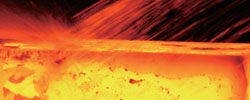
- Grain sizing using the intercept counting method
- Grain sizing using the planimetric method
- Graphite nodularity evaluation
- Rating the non-metallic inclusion content
- Comparison of sample images with reference standards
- Dendrite arm spacing measurement

- Welding distortion
- Phase and region of interest measurement
- Particle distribution

- Throwing power measurement
- Automatic critical dimension measurement

- Thin coating thickness evaluation (calotest method)
- Layer thickness measurement
- Pore fraction and density measurement
Smart Technology
Step-by-Step Guidance
The dynamic user interface reduces desktop clutter and confusion by only displaying the tools and functions you want to use. The interface guides you through every step of the process, including image capture, image processing, and report creation. Both simple and complex measurements can be easily conducted using the software’s intuitive set of tools.
Simple Layouts
The software’s organized layouts contain the minimum necessary functions for performing the required tasks. Simplified layouts help streamline the inspection workflow and efficiently guide users through the inspection process.
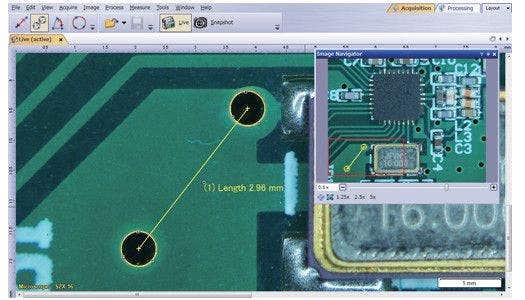
Fast measurements on a live image with just a few clicks of your mouse
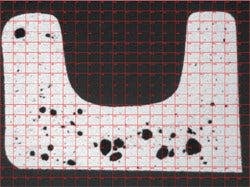
Estimating the pore size using live digital reticules
(Cross section of die casting)
Tools for Live Images
The software supports live image functions for instant feedback. The software enables you to interact with the live image, which is automatically calibrated, and perform quantitative measurements.
Fast Panorama and Extended Depth Focus
Quickly create images of samples that extend beyond the standard depth of focus or the field of view. The instant extended focus image (EFI) function uses the fine focus adjustment to combine many images taken at different Z-levels to build a single combined image that is entirely in focus. Instant multiple image alignment (MIA) makes it easy to create panoramic images simply by moving the XY stage; a motorized stage is no longer necessary.
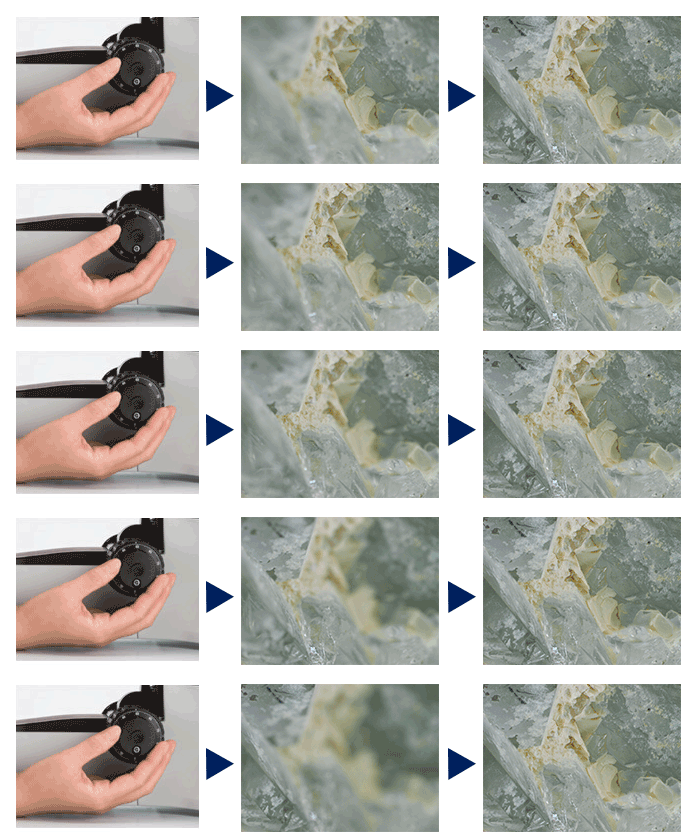
Instant EFI image of crystal: fully focused image is created even in low-contrast sample areas
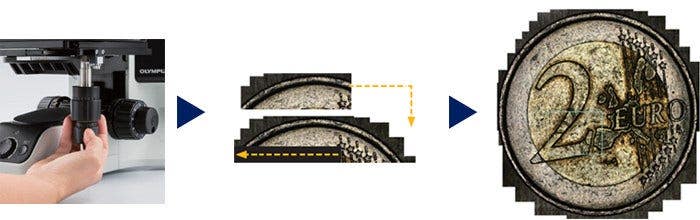
Instant MIA image of a coin
Recall Acquisition Setting
Quickly recall previously used camera settings to capture repeatable images with a consistent look and feel. When using a motorized microscope, this function can automatically recall previous hardware settings. If you’re using a BX, GX, or MX series microscope, the software guides you to manually recall settings.
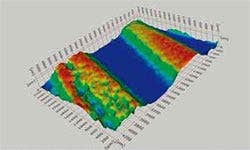
3D profilometry of wear track
3D Solution
This solution creates height maps from stacks of images acquired automatically or manually at different Z positions. The resulting image can be visualized in three dimensions using the surface view. Measurements, such as 3D profiles and height differences between two or several points, can be performed, and the results exported into workbooks and Microsoft Excel spreadsheets.
Guided Operation for Specific Analyses
The software guides you through the correct order of functions when performing image analysis, including methods that comply with most common international standards. When using a motorized stage, the alignment feature speeds up your work on multiple sample locations.
Automatic Calibration
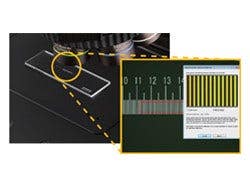
The automatic calibration feature uses a standard micrometer to calibrate the microscope and automatically generates a calibration report. This helps eliminate user variability in the calibration process for more reliable measurements.
Automated Inspection Tools
The software’s automated tools can create a very large set of data in just a few minutes. Automatic magnification calibration using a calibrated grating reticle helps ensure that your images are displayed with the proper scale bar and that your measurements are confirmed. Large areas can be imaged automatically using motorized XYZ stages, enabling the creation of images of large parts with high resolution.
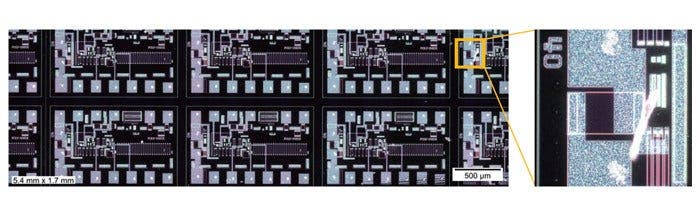
Sharp and high-contrast MIA image of integrated circuit (IC) pattern (dark field observation with 20X objective lens)
Quantitative Information that Matters
The software tools features quantitative information about your sample. Interactive measurements on live and still images provide the basic dimensional information (length, area, and diameter), and the results are directly visible on the image.
Advanced interactive measurements include the magic wand and complex polygonal shapes for semiautomatic area measurement, while the count and measure solution provides access to more than a one hundred single particle parameters for quantitative analysis based on the threshold method.
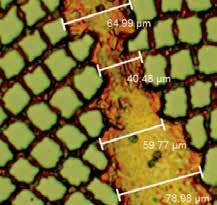
Basic measurement (supra conductor)
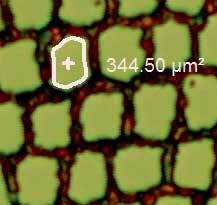
Magic wand (supra conductor)
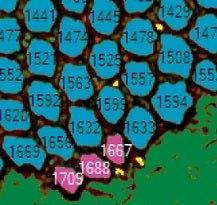
Object detection (supra conductor)
Efficient Report Creation
Creating a report often takes longer than capturing the image and taking the measurements. With the software, you can repeatedly produce smart and sophisticated reports based on predefined templates. Editing is simple, and reports can be exported to Microsoft Word, Excel, or PowerPoint. In addition, the software’s reporting tool enables digital zooming and magnification on acquired images. Report files are a reasonable size for easier data exchange by email.
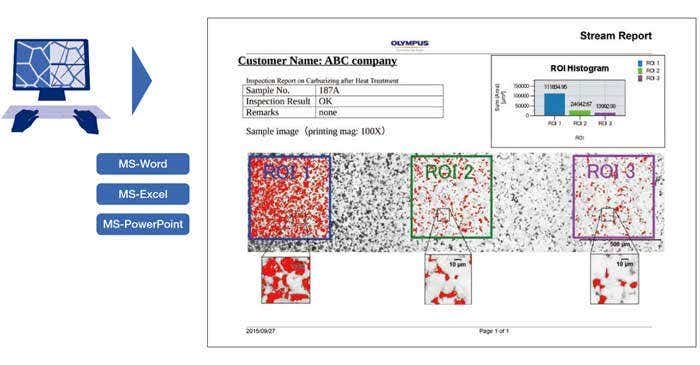
Professional report that summarizes particle counting data
Integrated Data Management
Stream Enterprise’s data management software enables workflows with large amounts of data and many users to run efficiently with a high level of data security.
- Comprehensive access authorization for data and functions across the entire network
- System architecture enables simple installations with minimal maintenance.
- Software Requirements: Microsoft SQL Server 2019 (or SQL Server Express)
User Rights
There are four user rights roles: administrator, power user, user, and guest. Each can be custom modified for more flexibility. In addition, you can assign access rights for each project or data record to defined individuals or members of a group. Authentication is possible via SQL logon when starting Stream Enterprise or via integration with an existing active directory and lightweight directory access protocol (LDAP) to provide single sign-on (SSO) capabilities.
Secure File Repository
For additional data security, Stream Enterprise offers the optional secure file repository (SFR) package. As an extra layer of security, the SFR works with Stream Enterprise to handle file requests based on a user’s access permission; users without permission to open a file will not see it in their file directory.
Integration
Stream Enterprise can be set up to interface directly with existing order management, LIMS, ERP, and CRM systems. For additional flexibility, the software has available built-in interfaces to digital communication protocols, such as component object model (COM) and open database connectivity (ODBC), which enable easier interfacing with other programs. Application programming interface (API) functionality has also been added to enable the use of Stream Enterprise processes by other programs.
Access to Existing Databases
Existing records from other databases can be imported into Stream Enterprise with all the relevant data and metadata properly organized. It is also possible to use some existing data sources without importing them (read-only access).
Your System
Customize Your Software Package
Developed for our microscopes, Stream Enterprise data management software is a powerful and user-friendly measurement tool. There is no need to manually record the optical parameters of UIS2 objectives when using it with a conventional microscope. Magnification calibration is also not required when importing images from our DSX and LEXT microscopes. The software is available from entry-level to advanced packages.
OLYMPUS Stream Packages
OLYMPUS Stream software is available in four packages based on functionality—Start, Basic, Essentials, and Motion.
Application-specific materials solution modules can be added to streamline repetitive analysis tasks. Evident representatives can help you determine which package is right for you.
Seamlessly Integrates with Most Evident Optical Microscopes
Control Upright Microscopes
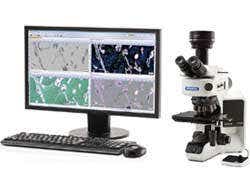
BX53M microscope and software system
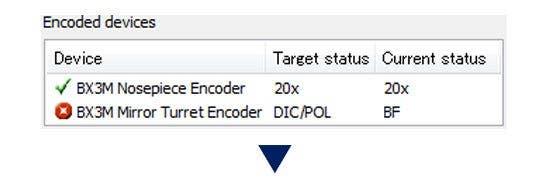
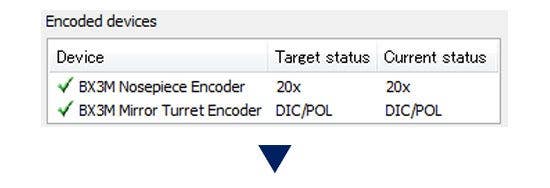
The BX53M microscope employs coded functions that integrate the microscope’s hardware settings with Stream Enterprise data management software. The observation method, illumination intensity, and objective position are all recorded by the software and/or the handset. The microscope settings can be automatically saved with each image, making it easier to reproduce the settings at a later time and provide documentation for reporting purposes.
Control Inverted Microscopes
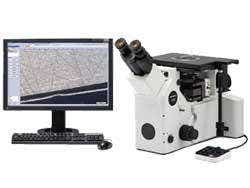
GX53 microscope and software system
Choose from extended measurements, standard metallography, and advanced metallography application-specific modules (over a dozen application specific routines are available), and automatically populate data and create reports that comply with common ASTM and ISO specifications.
Control Semiconductor Microscopes
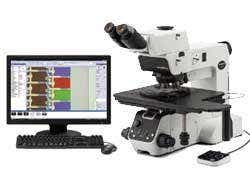
Integrated microscope and software system
We offer several software platforms that integrate with our semiconductor microscope frames to control all motorized functions, including the digital camera and motorized stage. Each interface is designed for basic inspection and control, advanced image analysis, or repetitive site inspection and defect review.
Control Stereo Microscopes
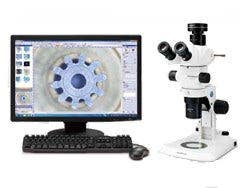
SZX16 microscope and software system
Our stereo microscope motorized focus drive makes digital documentation with extended focal imaging (EFI) efficient and fully automatic. This even enables the creation of pseudo 3D images. The software offers tools for simple 2D measurements up to complex phase analysis and support many operations including observation, report generation, database creation, and archiving.
Enhance the Power of Evident Confocal and Digital Microscopes
Use Stream Enterprise Data management software for post-processing (Stream Enterprise Desktop) with the complete range of DSX series digital microscopes and the LEXT 3D measuring laser microscope.
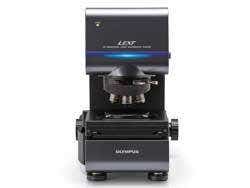
LEXT 3D measuring laser microscope
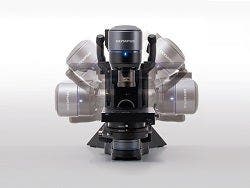
DSX digital microscope series
View the LEXT 3D Measuring Laser Microscope
View the DSX Digital Microscope
Supports Most Evident Digital Cameras
Resolution and Color Fidelity
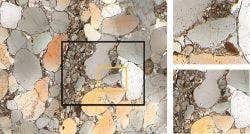
The low-noise, high-resolution images of a 9-megapixel sensor enable the user to zoom deep into the sample, revealing its structures (sandstone)
Reveal More with Infrared (IR)
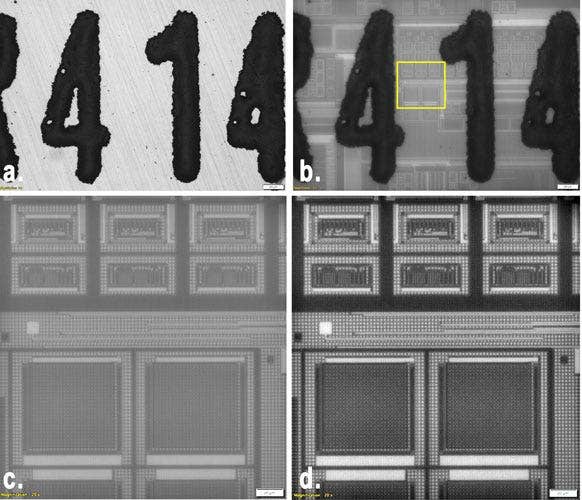
Brightfield image 5x taken with the DP23M monochrome camera,
a. Brightfield image 5x
b.) IR image 5x (BP1100 nm filter),
c.) Cropped detail 20x IR,
d.) Cropped detail 20x IR with DCE filtering
IR imaging mode is a fundamental tool for quality control and R&D laboratories. IR mode enables nondestructive inspection through silicon layers of packaged products during the backend stage of fabrication.
Dedicated Observation Methods for Materials Science
HDR imaging for enhanced contrast
High dynamic range (HDR) imaging improves image contrast in difficult conditions (very bright areas together with very dark areas in the same image). All cameras supported by Stream Enterprise data management software can be used in this mode, and dedicated cameras have an available live mode.
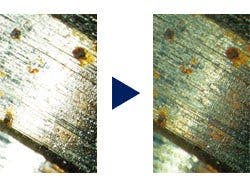
Clearly exposed for both dark and bright parts by HDR (Sample: fuel injector bulb)
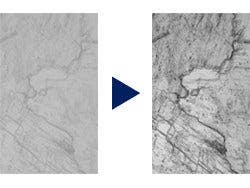
Contrast enhancement by HDR (Sample: Sliced magnesite)
MIX observation to visualize sample’s surface structure
The software supports our MIX observation
This illumination technique combines directional darkfield, which uses a circular LED to illuminate one or more quadrants at a given time, , and brightfield, fluorescence, or polarization, enabling you to highlight defects and differentiate raised surfaces from depressions that are normally difficult to see with conventional microscopes. MIX observation helps reduce a sample’s halation and is useful for visualizing a sample’s surface texture.
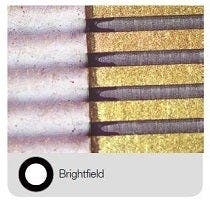
Conventional: brightfield shines the light straight down on the sample while traditional darkfield highlights scratches and imperfections on a flat surface by illuminating the sample from the side of the objective
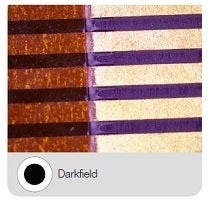
Conventional: brightfield shines the light straight down on the sample while traditional darkfield highlights scratches and imperfections on a flat surface by illuminating the sample from the side of the objective

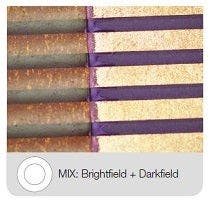
Advanced: MIX is a combination of brightfield
and directional darkfield from a ring of LEDs;
the LEDs can be adjusted to select which
direction to illuminate from
Solutions
Solving Your Inspection Challenges
Industrial labs often require repeatable and reproducible results as part of their standard operating procedures. Stream Enterprise Data Management software facilitates inspection, measurement, and analysis with a simple and reliable workflow. The software offers a variety of tools for various materials science analyses, so you can be confident in your results.
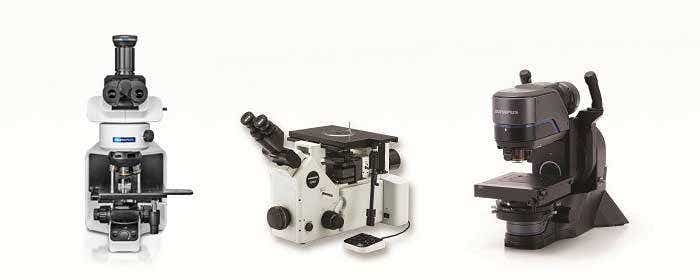
Evident industrial microscopes support metallurgical analysis solutions
Count and Measure Solution
The software’s count and measure solution uses advanced threshold methods to reliably separate objects, such as particles and scratches, from the background. More than 50 different object measurement and classification parameters are available, including shape, size, position, and pixel properties.
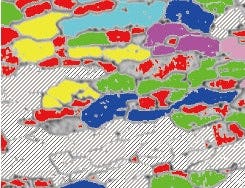

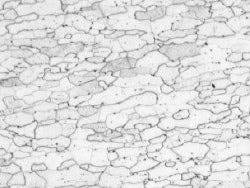

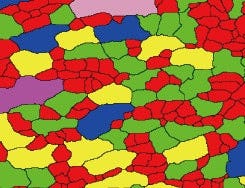
Unclear grain boundaries
(original image)
Grain boundaries are clearly detected
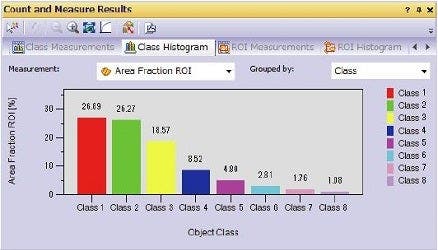
Grain classification results
Efficient Analysis
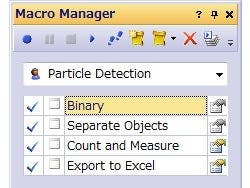
Example of Macro Manager set up for Count and Measure
Powerful Image Filters
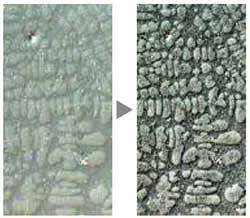
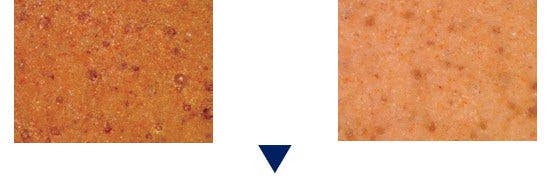
Enhanced contrast using the DCE filter (dendrite in an aluminum casting)
TruAI™ Deep-Learning Technology
Image segmentation using conventional threshold methods that depend on brightness or color can miss critical information or targets in samples. The Stream Enterprise data management TruAI solution offers a more accurate segmentation approach using deep-learning technology for a highly reproducible and robust analysis, including instance segmentation to split an image into individual instances of an object.
- Intuitive user interface to efficiently label images and train robust models with excellent generalization properties
- Pre-trained networks can be applied to future analyses for a similar application
- Deep-learning image segmentation is useful for a range of materials science applications, including metallic analysis, semiconductor quality control, and mineralogy
Learn more about TruAI deep learning
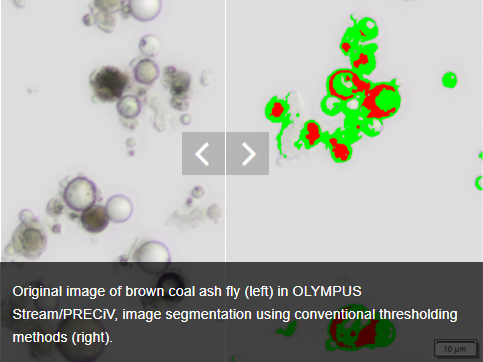
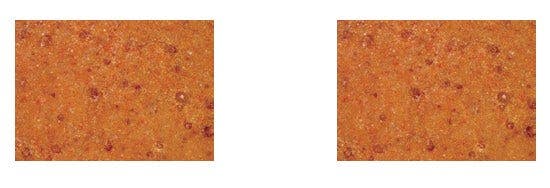
Original image of brown coal ash fly (left) in OLYMPUS Stream/PRECiV, image segmentation using conventional thresholding methods (right).
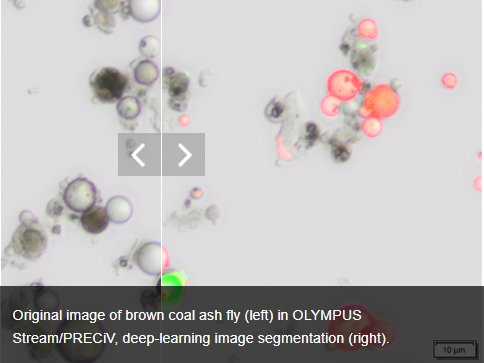
Original image of brown coal ash fly (left) in OLYMPUS Stream/PRECiV, deep-learning image segmentation (right).
Three-Dimensional Measurement and Line Profiles
The Stream Enterprise Data management 3D solution provides coded and motorized Z control and instant EFI with height mapping capabilities to measure a three-dimensional sample.
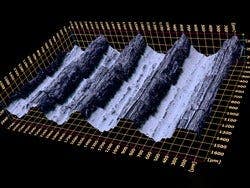
3D surface view (Roughness test sample)
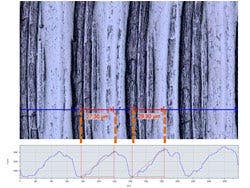
Single view and 3D profile measurement
Metallography is used in materials development, incoming inspection, production and manufacturing control, and failure analysis.
- Grain sizing using the intercept counting method
- Grain sizing using the planimetric method
- Graphite nodularity evaluation
- Rating the content of non-metallic inclusions in high-purity steel
- Compare sample images with reference standards
- Automatically or manually measure dendrite arm spacing
To produce parts that are high quality, scratches, cracks, pore size, and contamination is strictly monitored during the production process.
- Welding distortion
- Phase and ROIs measurement
- Particle distribution
In printed circuit boards, very thin plates are coated and verifying the homogeneity of this coating is a key element of product quality.
- Throwing power measurement
- Automatic critical dimension measurement
Surface coatings are any mixture of film-forming materials that contain pigments, solvents, and other additives, which, when applied to a surface and cured or dried, yields a thin film that is functional and often decorative.
- Thin coating thickness evaluation (calotest method)
- Layer thickness measurement
- Pore fraction and density measurement
Materials Solutions for Every Purpose
This function is based on overlaying of “test lines” and counting the number of intercepts with grain boundaries.
This function reconstructs boundaries for each grain and conducts grain sizing with the area percentage of the second phase.
| Solutions | Metal/ Casting | Automotive | Glass/ Ceramic | Coating | Consumer goods | Electronic devices |
| Grain Intercept | ■ | ■ | ■ | |||
| Grain Planimetric | ■ | ■ | ■ | |||
| Inclusion Worst Field | ■ | ■ | ■ | |||
| Cast Iron | ■ | ■ | ■ | |||
| Chart Comparison | ■ | ■ | ■ | |||
| Layer Thickness | ■ | |||||
| Coating Thickness | ■ | |||||
| Automatic Measurements | ■ | ■ | ||||
| Throwing Power | ■ | ■ | ||||
| Porosity | ■ | ■ | ■ | ■ | ■ | ■ |
| Particle Distribution | ■ | ■ | ■ | ■ | ■ | ■ |
| Solutions | Metal/ Casting | Automotive | Glass/ Ceramic | Coating | Consumer goods | Electronic devices |
| Grain Intercept | ■ | ■ | ■ | |||
| Grain Planimetric | ■ | ■ | ■ | |||
| Inclusion Worst Field | ■ | ■ | ■ | |||
| Cast Iron | ■ | ■ | ■ | |||
| Chart Comparison | ■ | ■ | ■ | |||
| Layer Thickness | ■ | ■ | ||||
| Coating Thickness | ■ | |||||
| Automatic Measurements | ||||||
| Throwing Power | ||||||
| Porosity | ■ | ■ | ■ | ■ | ■ | ■ |
| Particle Distribution | ■ | ■ | ■ | ■ | ■ | ■ |
| Advanced Phase Analysis | ■ | ■ | ■ | ■ | ■ | ■ |
Specifications
Main License Specifications
| Enterprise | Desktop | ||
| Image Acquisition | Basic image acquisition including HDR and auto-calibration of magnification and Live HDR*1, and position navigation*1 | ■ | |
| Software autofocus*2 and movie acquisition (Avi format) | ■ | ||
| Time lapse, Instant EFI, and Instant/Manual MIA*3 | ■ | ||
| Motorized EFI/MIA and Z-stack acquisition | ■ | ||
| Image and Customization Tools | Basic tool windows (Image history, properties, navigator, gallery view tool window)*4 | ■ | ■ |
| Annotations, layer management, scale bar, cross hair, info stamp display, and image filters | ■ | ■ | |
| Digital reticle/grid, line profile display, My Function, layout management, and Macro Manager | ■ | ||
| Measurements/ Image Analysis | Basic interactive measurement (distance, angles, rectangles, circles, ellipses, polygons, circle-to-circle distance, angle ruler, and line ruler) and data export to MS-Excel | ■ | ■ |
| Phase analysis, magic wand, freehand polyline, interpolated polygon, morphology filter, and image arithmetics | ■ | ■ | |
| 3D measurements, 3D profile measurements, and 3D surface view | ■ | ■ | |
| Reporting*5 | Report creation (MS-Word, and MS-Excel formats) | ■ | ■ |
| Presentation creation | ■ | ■ | |
| Data Management | Client/Server data management system for an unlimited number of simultaneous database users**6 | ■ | ■ |
| User-/project-oriented administration of images and other documents | ■ | ■ | |
| Variable user rights for image and data | ■ | ■ | |
| Fast and controllable data access | ■ | ■ | |
| High-performance search functions | ■ | ■ | |
| Supported DBMS: Microsoft SQL Server 2008 R2/R2 Express, Microsoft SQL Server 2012 (SP1 and SP2)/Express (SP1 and SP2), Microsoft SQL Server 2014/Express, Microsoft SQL Server 2017/Express, Microsoft SQL Server 2019/Express, Oracle 11g R2/express, Oracle 12g R2/Express | ■ | ■ | |
| Sophisticated service for secure storage due to secure file repository (SFR) technology | ■ | ■ | |
| Device Support | Evident microscopes**7 and Evident cameras*8 | ■ | |
| Non-Evident cameras and image source converters*9 | ■ | ||
| Non-Evident stage controllers*9 | ■ | ||
*1 Requires the DP74 camera, and the Live HDR function requires 64-bit OS.
*2 Requires Evident microscope with motorized Z-axis or external motorized Z-axis
*3 Instant MIA may not work properly with some cameras
*4 Write and read all major file formats and open Evident proprietary formats (DSX, LEXT and POIR file formats)
*5 Requires Microsoft Word 2010, 2013, 2016, 2019, or Office 365 to be installed beforehand (not provided).
*6 Using Microsoft SQL Server Express
*7 Supports BX53M, BX2, IX2, GX, GX53, SZX, SZX2, SZX-ZE, MX, MX63, MX63L, MVX, STM7-CB, CBS, BX3M-CB, BX3M-CBFM, BX-REMCB.
*8 8 Supports LC20, LC30, LC35, DP22, DP23, DP27, DP28, DP73, DP74, SC30, SC50, SC100, SC180, UC30, UC50, UC90, XC10, XC30, XC50, XM10, DP23M.
*9 Please contact Evident for supported device information
*10 Starting with Stream 2.5, Evident cameras DP74, DP73 and SC180/UC90 are compatible with Windows 10/8.1 only. Windows 7 is no longer supported.
*11 Required configurations for Live HDR in DP74. Graphic board applicable to CUDA made by NVIDIA (compute capability 2.1 or higher). Graphic board driver applicable to CUDA 9.1 or higher.
Special Solution Specifications
| Solutions | Compatiblity | Functions | |
| Enterprise | Desktop | Measurement Type | |
| 3D | Included | Partially included* | 3D Surface View, 3D Measurement, 3D Profile Measurement, Motorized Z-stack/EFI, Instant EFI with height map (requires coded or motorized Z-axis). |
| Weld Measurement | ■ | ■ | Weld Measurement solution (measurements for geometric distortion introduced by the heating during welding). |
| Count & Measure | ■ | ■ | Multiple threshold methods are available (automatic, manual HSV, manual and adaptive) The system can automatically measure multiple parameters on all segmented objects (Area, Aspect Ratio, Bisector, Bounding Box, Gravity Center, ID, Mass Center, Intensity Values, Convexity, Diameters, Elongation, Feret, Extent, Next Neighbor Distance, Orientation, Perimeter, Radius, Shape, Sphericity, etc.), Spreadsheet and charts with individual and distribution measurements. |
| TruAI™ Deep-Learning Technology | ■ | ■ | Training of Neural Networks using semantic (well separated objects) or instance (touching borders objects) segmentation methods. |
* Not possible to use the functions relating to image acquisition
Materials Solutions Specifications
| Solutions | Output | Functions | |||||
| Enterprise | Desktop | Automatic Report | Workbook with Individual | Store All Results in the Image Properties | Measurement Type | Supported Standards | |
| Grain Intercept | ■ | ■ | ■ | ■ | ■ | Selection of pattern (circles, cross, cross circles, vertical lines, horizontal lines, horizontal vertical lines) Definition of the number of test lines for determination of grain elongation Displays the G-value in the Material Solution tool window | ASTM E112-13(2021), ISO 643:2020, JIS G 0551:2020, JIS G 0552:1998, GOST 5639-82, GB/T 6394-2017, DIN 50601:1985, ASTM E1382-97(2015) |
| Grain Planimetric | ■ | ■ | ■ | ■ | ■ | Automatic extraction of grain boundaries User interaction using Stream sliders for improved usability Displays the G-value histogram in the Material Solution tool window for direct interaction | ASTM E112-13 (2021), ISO 643:2020, JIS G 0551:2020, JIS G 0552:1998, GOST 5639-82, GB/T 6394-2017, DIN 50601:1985, ASTM E1382-97(2015) |
| Non-Metallic Inclusions | ■ | ■ | ■ | ■ | ■ | Automatic detection of non-metallic inclusion using colors, shape, and size Automatic classification of oxides, sulfides, silicates, and aluminates Live display of the detected inclusion with its rating Statistical overview of inclusions on the entire scanned area | ASTM E45-18a (method A), DIN 50602:1985 (method M), ISO 4967:2013 (method A), GB/T 10561-2005 (method A, equivalent to ISO 4967), JIS G 0555:2003 (method A, equivalent to ISO 4967), UNI 3244:1980 (method M), EN 10247:2017 (methods P and M), EN 10247:2007 (methods P and M), ASTM E45-18 (method D), ISO 4967:2013 (method B), SEP 1571-2017 (methods M and K), EN10247:2017 (method K). |
| Cast Iron | ■ | ■ | ■ | ■ | ■ | On polished samples: automatically measures the characteristics of the graphite content (size, shape, and distribution) On etched samples: measures the ferrite to pearlite ratio Integrated workflow that takes into account the sample status (etched or polished) | EN ISO 945-1:2018, ASTM A247-17, JIS G 5502:2001, KS D 4302:2006, GB/T 9441-2009, ISO 16112:2017, JIS G 5505:2013, NF A04-197:2017, ASTM E2567-16a (for nodularity only) |
| Chart Comparison | ■ | ■ | ■ | ■ | Multiple displays available, including live overlay User interaction using Stream sliders for improved usability Calculates statistics on the selected values | DIN 50602:1985, ISO 945-1:2019, ISO 643:1983, ISO 643:2012, EN 10247:2017, SEP 1520:1998, SEP 1572:2019, ASTM E112:13(2021), ISO 4505:1978 | |
| Layer Thickness | ■ | ■ | ■ | ■ | Layer boundaries can be specified using automatic detection, magic wand, or manual mode (using 2 or 3 points) Individual measurements can be added or deleted later on Measurement of any type of layers (with even or uneven boundaries) is supported Layer thickness measurement calculates mean, maximum, and minimum values as well as statistical data for each individual layer | ||
| Coating Thickness | ■ | ■ | ■ | ■ | ■ | Prints are measured from top view Calculation of the coating thickness according to the sample geometry | EN 1071-2:2002, VDI 3824: 2001, ISO 26423:2016 |
| Dendrite Arm Spacing | ■ | ■ | ■ | ■ | ■ | Determines the mean dendrite arm spacing in cast aluminum alloys | |
| Automatic Measurements | ■ | ■ | Automatically measures distances (point-to-point, point-to-line, circle-to-circle, point-to-circle, line-to-circle) Automatically measures circle diameter (roundness, bounding box) Automatically measures angles between two lines Definition of tolerances values for measurement and visual validation Expert and user mode for measurement repeatability |
||||
| Throwing Power | ■ | ■ | ■ | ■ | Manual measurements of selected point of interest on the sample Predefined points that will be triggered by the operator Selection of the vias type and documentation of the analysis Report and automatic calculation according to the manual measurements | ||
| Porosity | ■ | ■ | ■ | ■ | ■ | Pore detection per ROIs (triangle, circle, rectangle, polygon, or magic wand) with overlapping capability Measurement of the pore density, count, and specific area Measurement of the biggest pore Measurement of a specified size range | |
| Particle Distribution | ■ | ■ | ■ | ■ | ■ | Particles are defined using simplified threshold settings Automatic classification according to a selected parameter (size, color, or shape) Measurement of ROIs and multiple thresholds Definition of validation and coding according to user-defined standards | |
| Advanced Phase Analysis | ■ | ■ | ■ | ■ | ■ | Phase fraction per ROIs (triangle, circle, rectangle, or polygon) Magic wand, freehand polyline, interpolated polygon, morphology filter, and image arithmetics also usable Measurement of the total phase percentage per phase and per ROI Selectable minimum area detection | |
*2 Stream Enterprise chart with the distribution can be output.